AI 3D Generator: Turn text or photos into print-ready 3D models
Describe an idea or upload a photo. In about a minute you'll have a print-optimized STL, OBJ, or GLB for any FDM or resin printer. No CAD skills needed.
- 400,000+ makers
- 2M+ models generated
- No credit card to start
Used by makers, engineers, and educators at


From figurines to functional parts
A few of the models makers have generated with PrintPal: decor, toys, tabletop terrain, and parts that fix real problems.
Your idea could be next
Describe it in a sentence or snap a photo, and watch it take shape.
Try it nowFrom idea to print in three steps
No modeling software and no learning curve.
Describe it or upload a photo
Type a sentence or drop in a photo or sketch. A clear description of one object works best.
AI builds the mesh
In about a minute you get a 3D model that's repaired and optimized for printing. Preview it, then refine it with AI edits on Pro.
Download and print
Export STL, OBJ, or GLB and slice it in Bambu Studio, PrusaSlicer, Cura, or OrcaSlicer. Or order a print from us.
Pro turns your ideas into products
Free is a great way to try photo-to-3D. Pro adds the features makers and sellers rely on, for less than a spool of filament a month.
Text-to-3D
Skip the photo. Describe any object in plain words and get a printable model back. It's the fastest way from idea to part.
Refined & Production quality
Sharper detail and cleaner surfaces for final prints. Pro includes 20 Production-quality models a month, and 40 in your first month.
Full-color models
Generate textured, full-color models for display pieces, painting references, and multi-color prints.
AI-powered edits
“Make it taller.” “Add a base.” “Hollow it out.” Refine a model in plain language instead of starting over.
20× the generations
200 generations a month on Pro and 500 on Studio, on a priority queue that stays fast at busy times.
Commercial rights
Sell prints and digital files on Etsy, at craft fairs, or to clients. The Free plan is for personal use only.
from idea to a print-ready file. The same part can take hours to model in CAD.
usually covers the month. Custom 3D-printed gifts often sell for $15–$40.
more generations than Free, plus text-to-3D and Production quality.
45+ tools to make every model your own
Generate a model, then make it articulated, cut it into a puzzle, or add a fidget clicker. Most tools are free, and Pro unlocks the premium ones. Everything runs in your browser.

Flexi Model Creator
Add ball joints to any model for print-in-place articulated toys.

Fidget Clicker Maker
Build multi-color MX clickers, or cut a click mechanism into any model.
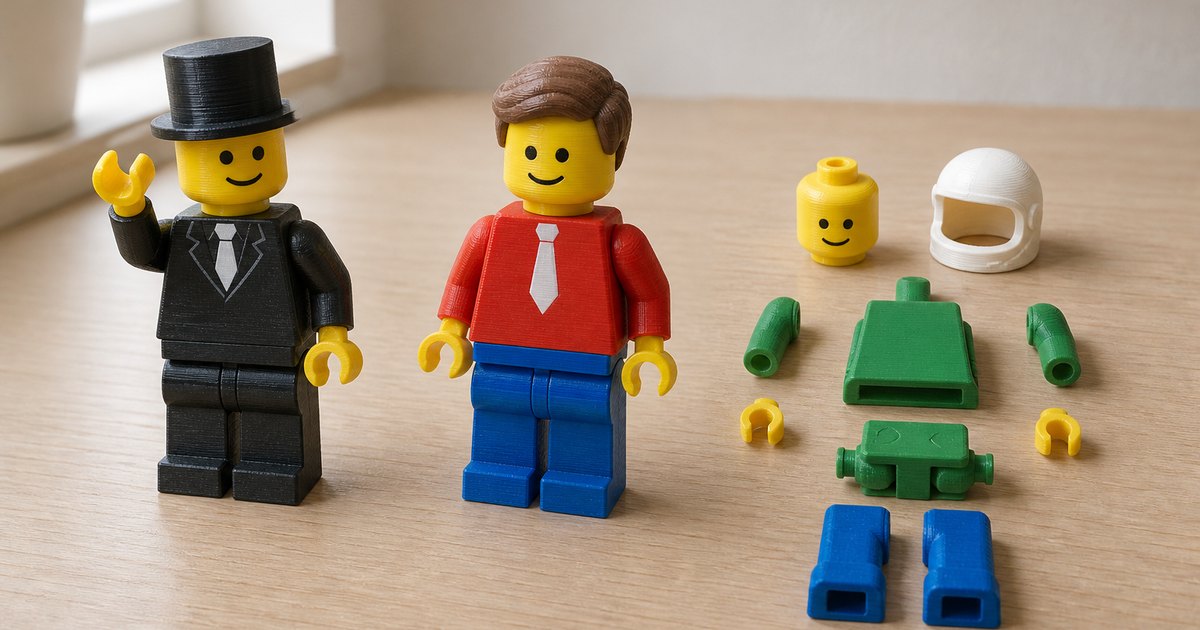
Minifigure Maker
Design and pose custom articulated minifigures, with AI-generated heads.

Bin & Tray Generator
Custom storage bins, drawer inserts, and Gridfinity-compatible baseplates.

3D Puzzle Maker
Turn any STL into an interlocking jigsaw puzzle with print tolerances built in.

Lithophane Generator
Turn a photo into a backlit lithophane panel or curved lamp shade.

Filament Painter
Create multicolor prints from any image by layering filament colors.

3D Brick Builder
Snap construction-style bricks together and export every printable STL.
Built for the way you make
Whatever you're printing, there's a plan that fits.
Makers & hobbyists
Figurines, replacement parts, cosplay props, and gifts, without learning CAD.
Etsy & market sellers
Say yes to custom orders, turn customer photos into models, and sell with commercial rights included.
Teachers & schools
Students describe an idea, see it in 3D, and print it in the same class period.
Print farms & shops
Keep up with custom requests using 500 generations a month and the largest Production allowance.
Loved by makers, teachers, and print shops
Join 400,000+ creators turning ideas into prints.
“I'd given up on CAD twice before trying this. Honestly didn't expect much, but the first model I described came out pretty close to what I had in mind. Now I take custom orders on Etsy that I used to turn down. Worth the $10 a month for me.”
“I teach high school tech. Used to spend whole units just covering CAD basics before kids could make anything real. Now they describe what they want, see a model, and we print it that period. Not every output is perfect on the first try, but figuring out why and tweaking the prompt is honestly more useful than the old workflow.”
“I run a small print farm and got Studio mostly for the higher generation count. Was pretty skeptical going in, most AI tools overpromise. Super Resolution mode ended up being what I use most. Customers ask for complicated parts constantly and send photos. Paid for itself in about the first few minutes for a custom order.”
Start free. Upgrade when you're ready to sell.
Simple plans, no contracts. Cancel anytime from your account settings.
Free
For trying photo-to-3D
Free forever · no credit card
- 10 AI generations / month
- Photo to 3D
- Draft quality
- STL & OBJ export
- 35+ free browser tools
- Text to 3D
- Refined & Production quality
- Commercial rights
Pro
For makers & sellers
Billed monthly · cancel anytime
Secure checkout with Stripe
- 200 AI generations / month
- Text to 3D and photo to 3D
- Refined & Production quality
- 20 Production models / month (40 in month one)
- Full-color models
- AI-powered model edits
- Priority queue
- STL, OBJ, GLB & PLY export
- Premium tools: Flexi, Fidget Clicker, Minifigure & more
- Commercial rights
Studio
For print farms & power users
Billed monthly · cancel anytime
Secure checkout with Stripe
- Everything in Pro, plus
- 500 AI generations / month
- 60 Production models / month (80 in month one)
- Built for steady custom-order volume
Schools & teams
Discounted Pro seats with class rosters, assignments, invoices, and a free trial.
Enterprise & API
Unlimited generations, REST API access, and dedicated support.
Frequently asked questions
Everything you need to know about PrintPal's AI 3D generator.
What is an AI 3D generator?
Are the generated 3D models ready to print?
Is PrintPal's AI 3D generator free?
What's the difference between Free, Pro, and Studio?
Can I sell the models and prints I make?
What file formats can I export?
How long does it take to generate a 3D model?
Do I need 3D modeling or CAD experience?
Can I edit a model after it's generated?
What happens if I run out of generations?
Do you offer plans for schools and teams?
Can I cancel my subscription any time?
Still have questions? Contact our team
Your first model is a minute away
Start free with photo-to-3D, or go Pro to turn any idea into a print-ready model with text-to-3D, Production quality, and commercial rights.