Learn OpenSCAD and design CAD with AI
A beginner tutorial, a complete OpenSCAD reference with examples you can run in one click, and practical guides to designing printable parts with the PrintPal CAD Agent. Free, and everything runs in your browser.
A wall hook for a 30 mm broom handle: 4 mm thick, 60 mm tall back plate, two countersunk holes for M4 screws, rounded edges.
Opens the CAD Agent with this prompt filled in. Edit it before you send.
Pick a learning path
Short lessons in order. Progress is saved in this browser, so you can stop and come back.
Learn OpenSCAD
Eight short lessons from your first cube to reusable libraries.
- 1OpenSCAD tutorial for beginners10 min
- 2Language reference7 min
- 33D primitives7 min
- 42D shapes & extrusion7 min
- 5Transformations9 min
- 6Boolean operations6 min
- 7Modules & functions6 min
- 8Libraries: BOSL2 & MCAD7 min
Design with the AI CAD agent
Go from a one-line idea to an editable part you can print or export to STL, 3MF and STEP.
- 1Using the AI CAD agent9 min
- 2Prompting for AI CAD9 min
- 3Image-to-CAD workflow7 min
- 4Parametric design guide8 min
- 5Designing for 3D printing11 min
- 6AI CAD example gallery11 min
Get started
Two ways in: learn OpenSCAD by hand, or describe the part and let the AI CAD agent write it.
OpenSCAD tutorial for beginners
Build your first parametric part from scratch in about 10 minutes. Runs in your browser, nothing to install.
AI CAD agent guide: text to CAD
The chat, @feature references, Simple vs Advanced mode, auto-fix, auto-iterate and exports in one tour.
How to prompt AI for CAD
Write prompts that produce printable parts on the first turn: envelopes, tolerances, hardware and units.
Image to CAD: sketch or photo to a CAD model
Turn sketches, photos and screenshots into editable parametric OpenSCAD with the vision-capable agent.
Skip the syntax and let AI write the OpenSCAD
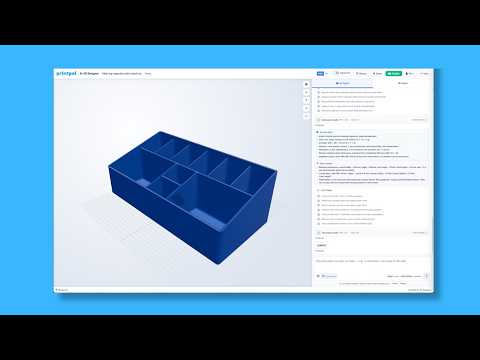
Describe the part, attach a sketch or photo, and the CAD Agent writes editable parametric code with a live 3D preview and STL/3MF export.
OpenSCAD reference
Everything you need to read or write OpenSCAD by hand, with copy-ready examples you can open in the editor.
OpenSCAD cheat sheet
Every operator, primitive, transformation, function and special variable on one searchable page.
OpenSCAD language reference
Variables, vectors, ranges, list comprehensions, if/else, for loops and special variables like $fn.
OpenSCAD 3D primitives
cube, sphere, cylinder, polyhedron and import: parameters, defaults and the gotchas that bite.
OpenSCAD 2D shapes & extrusion
circle, square, polygon, text, linear_extrude and rotate_extrude, plus importing SVG and DXF.
OpenSCAD transformations
translate, rotate, scale, mirror, hull, minkowski and offset, with fillet, chamfer and array patterns.
OpenSCAD boolean operations
union, difference and intersection, and the CSG patterns that make complex parts simple.
OpenSCAD modules & functions
User-defined modules, functions, children(), include vs use: how to write reusable parametric CAD.
OpenSCAD libraries: BOSL2 & MCAD
BOSL2 and MCAD come pre-installed in the browser editor: threads, gears, rounding, attachments and licenses.
Design guides
Design habits that keep parts printable, editable and easy for the agent (and future you) to change.
Parametric design in OpenSCAD
Structure variables, modules and feature names so every dimension stays one edit away.
Design for 3D printing: walls, tolerances, overhangs
Wall thickness, clearances, overhangs, bridges, holes and orientation rules for parts that print first time.
AI CAD examples with OpenSCAD code
Real prompts and the parts they produce: brackets, enclosures, gears, knobs, bins and more. One click to try each.
Frequently asked questions
Quick answers about OpenSCAD and the PrintPal CAD editor.
What is OpenSCAD?
OpenSCAD is free, open-source CAD software where you describe a 3D model in a short script
instead of drawing it with the mouse. You combine primitives (cube, sphere,
cylinder), transformations (translate, rotate, scale)
and boolean operations (union, difference, intersection).
Because every dimension is a variable, changing one number regenerates the whole model, which makes
it ideal for parametric, 3D-printable parts.
Can I use OpenSCAD online without installing it?
Yes. The PrintPal CAD editor runs the OpenSCAD compiler in your browser as WebAssembly, with the BOSL2 and MCAD libraries pre-installed. You can write code, render a 3D preview and export STL or 3MF without installing anything.
Is OpenSCAD good for beginners?
Yes, if you are comfortable typing short commands. The language has only a few dozen keywords and the free tutorial builds a real parametric part in about 10 minutes. If you would rather not write code, the CAD Agent writes the OpenSCAD from a plain-English description and you can read the result to learn.
What file formats can the PrintPal CAD editor export?
STL and 3MF for slicers are always available. With Advanced mode on, you can also export STEP, OFF and the raw OpenSCAD source. The STEP file is a faceted solid: it opens in Fusion 360, SOLIDWORKS, Onshape and FreeCAD, but curved surfaces arrive as many flat faces rather than true cylinders or fillets. See STL vs 3MF vs STEP for when to use each.
Where should I start in the documentation?
New to OpenSCAD: start with the OpenSCAD tutorial for beginners and follow the Learn OpenSCAD path above. Want a part today with as little code as possible: start with Using the AI CAD agent. Already know OpenSCAD: the cheat sheet and language reference are the fastest way back in.
Looking for 3D printing help instead?
The PrintPal wiki covers print failures, error codes, filament settings and calibration.