About this video
What Is the AI CAD Agent for 3D Printing?
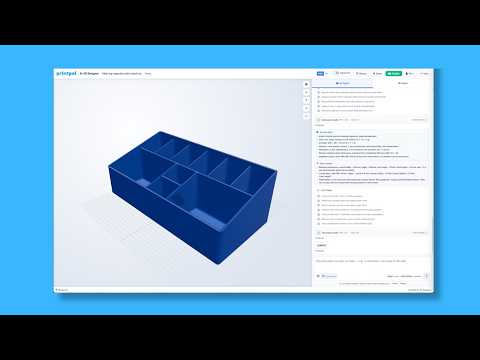
A new wave of text-to-CAD tools lets you describe a mechanical part in plain English and receive a printable 3D model in return. Instead of clicking through menus in traditional CAD software, you simply type what you need — for example, "a snap-fit enclosure for a 25mm PCB" — and the AI CAD agent generates parametric code that defines the geometry.
How Text-to-Part Generation Works
The agent interprets your prompt and writes structured code (often OpenSCAD or a similar parametric format) describing the 3D object. Because the model is code-based rather than a static mesh, every dimension and feature remains editable. The interface typically displays a feature list — holes, bosses, fillets, snap clips — that you can click to tweak without rewriting the prompt.
Automatic Clearances for Moving Parts
One of the hardest parts of designing functional mechanisms is accounting for tolerances. The agent bakes in sensible default clearances for mating parts, hinges, and snap fits, so gears spin, lids clip, and pins slide without manual fudge factors. You can still override these values per feature when a project demands tighter or looser fits.
Adding Text and Labels to 3D Prints
Embossed or debossed text — part numbers, branding, instructions — can be added directly through the prompt or feature list. The text becomes a real geometric feature rather than a decal, so it prints cleanly alongside the rest of the model.
From Prompt to Print in Minutes
Once the design looks right, export an STL or 3MF file and send it to your slicer. There is no install, no steep learning curve, and no need to memorize keyboard shortcuts.
Who Benefits Most
- Makers and hobbyists who want functional parts without learning Fusion 360 or SolidWorks.
- Engineers prototyping quickly and willing to refine AI-generated geometry.
- Educators and students exploring mechanical design concepts hands-on.
Limitations to Keep in Mind
The agent does not replace a trained designer. Complex assemblies, FEA-validated parts, and products headed for certification still need human expertise. Treat the output as a strong first draft you can iterate on.
FAQ
Do I need CAD experience? No. The tool is built for people who have never opened a parametric modeler.
What file formats are supported? Most agents export STL and 3MF, which work with every popular slicer.
Can I edit the AI-generated model? Yes — click any feature in the list to adjust dimensions, or edit the underlying code directly.