OpenSCAD boolean operations: difference, union and intersection
OpenSCAD boolean operations combine solids: union() merges them,
difference() subtracts every later child from the first, and
intersection() keeps only the volume they all share. This is called
constructive solid geometry (CSG), and almost every printable part is a stack of these
three operations.
difference()keeps the first child and removes all the others from it.- Make cutters overshoot by about 1 mm past every face they cut.
- Put
#in front of a cutter to see it in the desktop preview. - In the PrintPal editor, wrap a multi-piece part in
union()so it exports as one solid.
The three boolean operations at a glance
| Operation | Keeps | Child order matters? | Typical use |
|---|---|---|---|
union() | Everything in any child | No | Bosses, ribs and tabs on a base |
difference() | The first child minus all the others | Yes | Holes, pockets, slots, hollow shells |
intersection() | Only the volume inside every child | No | Domes, trimming, splitting a part in half |
union(): merge solids into one
union() joins its children into one solid. Overlapping volume is merged and
the internal faces disappear:
union() {
  cube([20, 20, 4]);
  translate([10, 10, 0]) cylinder(h=14, d=8, $fn=48);
}
Top-level objects in the PrintPal editor
Desktop OpenSCAD unions everything at the top level of a file for you when it renders. The PrintPal editor runs OpenSCAD with the experimental lazy-union feature, which skips that step: separate top-level objects are exported as separate, overlapping bodies. This file gives you two shells that pass through each other, not one solid:
cube([20, 20, 4]);
translate([10, 10, 0]) cylinder(h=14, d=8, $fn=48);| In the PrintPal editor | Result |
|---|---|
| Several shapes at the top level of the file | Separate bodies |
A for loop at the top level | One body per loop pass |
Shapes inside union(), difference() or intersection() | Merged |
Shapes inside a module, or inside one transform's { } block | Merged |
Wrap the part. Overlapping shells usually slice fine, but mesh checkers flag them as self-intersecting and booleans in other programs can fail. Put the whole part inside union() { … } or one top-level module call, such as bracket();.
difference(): cut holes and pockets
difference() keeps its first child and subtracts every child after it.
A through hole in a plate looks like this:
difference() {
  cube([40, 40, 4]);                          // base: the first child
  translate([20, 20, -1])
    cylinder(h=6, d=6, $fn=48);               // cutter: starts 1 mm below, ends 1 mm above
}
Order matters. Swap the two children and OpenSCAD keeps the cylinder minus the plate, which leaves two 1 mm discs where the cylinder stuck out above and below:
difference() {
  translate([20, 20, -1]) cylinder(h=6, d=6, $fn=48);
  cube([40, 40, 4]);
}
What does this produce? difference() { cylinder(h=10, d=5); cube(20, center=true); }
The cylinder is the first child, so it is the part being cut. The 20 mm cube completely contains it, so nothing is left. Put the cube first to get a cube with a hole.
Why cutters must overshoot: coplanar faces
When a cutter's face lies exactly on a face of the part, the two surfaces are
coplanar. Whether the cut goes through then depends on floating-point rounding.
Exact whole numbers on axis-aligned shapes often work, but tiny errors leave an
invisible skin or ragged geometry. Here 0.1 * 3 is really
0.30000000000000004, so the plate is a hair taller than the 0.3 mm cutter and the hole
stays closed:
t = 0.1 * 3;   // 0.30000000000000004
difference() {
  cube([20, 20, t]);
  translate([10, 10, 0]) cylinder(h=0.3, d=6, $fn=32);
}
Cutter faces flush with the part: a skin can survive, and the preview flickers (z-fighting).
Start the cutter 1 mm below and make it 2 mm taller than the plate, as in translate([x, y, -1]) cylinder(h=t + 2, …).
The same rule applies to unions: let a boss sink a little into the plate rather than touching it at exactly one face. Rotated parts make the problem worse because their coordinates are never exact.
Debug cutters with modifier characters
Cutters are invisible once they have done their job, which makes a misplaced one hard to find. Modifier characters go in front of any shape or operation:
| Character | In the F5 preview | In a full render |
|---|---|---|
# debug | Shows the shape in transparent red and still uses it | Shape is used as normal |
% background | Shows a transparent grey ghost | Shape is left out |
* disable | Hidden | Shape is left out |
! root | Shows only this shape | Renders only this shape |
difference() {
  cube([40, 40, 4]);
  #translate([20, 20, -1]) cylinder(h=6, d=6, $fn=48);
}
In the PrintPal editor every run is a full render, so the # and % highlights do not show. To see a cutter there, change difference() to union() for one run, or put ! in front of the cutter to render it alone.
intersection(): keep the overlap
intersection() keeps only the space that is inside every child. A sphere
intersected with a cylinder that starts halfway up gives a domed button cap:
intersection() {
  sphere(r=12, $fn=64);
  translate([0, 0, 6]) cylinder(h=10, d=26, $fn=64);
}
Intersecting with a large cube is the quickest way to split a part so each half prints flat on the bed:
intersection() {
  sphere(r=20, $fn=64);                       // stand-in for your part
  translate([-50, -50, 0]) cube([100, 100, 50]);
}   // keeps the top half
Practical boolean patterns
Open-top box (shell)
Subtract a smaller block that starts one wall thickness in and pokes out of the top. For printing, 1.2 mm is a sensible minimum wall with a 0.4 mm nozzle; see the 3D printing design guide.
wall = 2;
size = [40, 30, 25];
difference() {
  cube(size);
  translate([wall, wall, wall])
    cube([size[0] - 2*wall, size[1] - 2*wall, size[2]]);
}
Plate with screw bosses
Union the bosses with the plate first, then cut every hole in one
difference() so the holes run through both:
holes = [[5, 5], [35, 5], [5, 25], [35, 25]];
difference() {
  union() {
    cube([40, 30, 4]);
    for (p = holes)
      translate([p[0], p[1], 0]) cylinder(h=12, d=7, $fn=32);
  }
  for (p = holes)
    translate([p[0], p[1], -1]) cylinder(h=14, d=3.4, $fn=32);
}
Countersunk holes
A 90° countersink is a cone whose depth is half the difference between the head and
shank diameters. Set head_d to your screw head plus a little clearance:
module csk_hole(d=3.4, head_d=6.5, plate_t=4) {
  head_h = (head_d - d) / 2;                        // depth of a 90° countersink
  translate([0, 0, -1]) cylinder(h=plate_t + 2, d=d, $fn=32);
  translate([0, 0, plate_t - head_h])
    cylinder(h=head_h + 0.01, d1=d, d2=head_d + 0.02, $fn=48);
}

difference() {
  cube([30, 20, 4]);
  translate([8, 10, 0])  csk_hole();
  translate([22, 10, 0]) csk_hole();
}
Cutaway view
Subtract a big block to look inside a part while you design it:
difference() {
  difference() {                              // your part: a hollow tube
    cylinder(h=30, d=20, $fn=64);
    translate([0, 0, 2]) cylinder(h=30, d=16, $fn=64);
  }
  translate([0, -50, -1]) cube([50, 100, 50]); // remove the +X half to look inside
}
render() and performance
render(convexity=4)
  difference() {
    cube(20, center=true);
    sphere(r=13, $fn=64);
  }
In desktop OpenSCAD, render() computes its child as a real mesh during the
F5 preview and caches it, which speeds up previews of heavy booleans and fixes preview
glitches. convexity only helps the preview draw shapes correctly: it is the
most surfaces a ray through the object can cross. The PrintPal editor always does a full
render with the fast Manifold engine, so render() makes no visible difference
there. Lowering $fn while you design is the bigger speed win; see
3D primitives.
Ask the CAD Agent for boolean-heavy parts
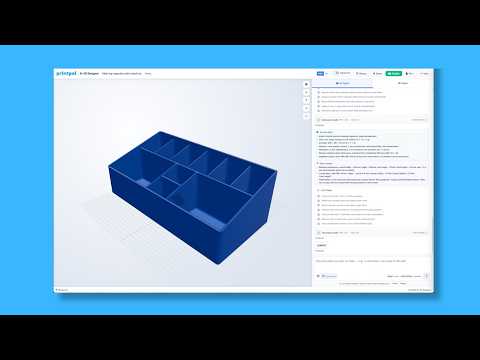
The CAD Agent writes these unions and differences for you. Give it finished sizes, wall thickness and where each cut goes.
Design an open-top storage box 80 x 60 x 40 mm with 2 mm walls and a 2 mm floor. Add four 6 mm screw bosses with 2.5 mm pilot holes in the inside corners, and a 12 x 6 mm cable slot centred on one short wall, open at the top edge. Make every cut overshoot by 1 mm and wrap the part in one union.
Make a 60 mm sphere and split it into two printable halves with flat bottoms. Add two 3 mm alignment pin holes, 4 mm deep, in each flat face, 15 mm from the centre, and place the halves side by side.
Frequently asked questions
Why does my OpenSCAD difference() not cut anything?
Usually the cutter does not reach all the way through, or it is in the wrong place. Make cutters start 1 mm below and end 1 mm above the faces they cut, check that the part you are cutting is the first child, and look at the cutter by putting # in front of it in a desktop preview or by swapping difference() for union() for a moment.
Does the order of children matter in OpenSCAD booleans?
Only for difference(). It keeps the first child and subtracts every child after it, so swapping them gives a different shape. union() and intersection() give the same result in any order.
What does the # character do in OpenSCAD?
It highlights a shape in transparent red in the F5 preview while still using it normally, which makes invisible cutters visible. % shows a ghost that is left out of the render, * disables a shape, and ! renders only that shape.
Do I need to wrap everything in union()?
Desktop OpenSCAD unions top-level objects for you when it renders. The PrintPal editor runs with the lazy-union feature, which keeps top-level objects as separate bodies, so wrap a multi-piece part in union() or a single module call to export one solid.
How do I cut a model in half in OpenSCAD?
Intersect the model with a large cube that covers the half you want to keep, or subtract a cube that covers the half you want to remove. Make the cube bigger than the model in every direction.
Sources & further reading
- OpenSCAD User Manual — CSG modelling (union, difference, intersection, render)
- OpenSCAD User Manual — Modifier characters (#, %, * and !)
- OpenSCAD — Downloads (development snapshots with the Manifold engine)
Tools for thisAll tools
Watch it doneVideo library
Thanks! We read every note and use them to decide what to update next.