By the PrintPal team
On this page
Key takeaways
- PrintPal (ours) is our top pick for printing: 10 free generations a month with STL and OBJ downloads, one watertight body per model in our tests, multi-color 3MF for Bambu AMS on Pro at $10 a month, and free repair, split and color tools for every next step.
- Meshy packs the most print prep into the generator itself (printability check, Auto Repair, split into parts, multi-color), but its free plan allows only 10 untextured Lite downloads a month and Pro costs $20.
- Tripo has the most generous free credits (200 a month), but free models are public and non-commercial. Hi3D's free trial cannot download at all.
- Open models (Hunyuan3D 2.1, TRELLIS.2, SF3D) are free to run but need a big GPU, output GLB and promise nothing about watertight meshes.
- Whatever you pick, run the 10-minute printability test below before you trust a generator with a long print.
The short answer
For 3D printing, PrintPal is our first pick: the easiest free way to download a watertight STL every month, at half the price of Meshy when you upgrade. Meshy has the most print tools inside the generator, and Tripo gives the most free credits if non-commercial use is fine. If you have a 24 GB GPU and Linux, TRELLIS.2 is free and MIT-licensed, but you will do the print prep yourself.
| Generator | Free tier | Cheapest paid | STL | 3MF | Print tools built in | Free-output license |
|---|---|---|---|---|---|---|
| PrintPal (ours) | 10 generations/mo with STL and OBJ | $10/mo ($8 yearly) | Yes | Pro | Watertight output, multi-color 3MF | Personal use |
| Meshy | 100 credits/mo, 10 Lite downloads | $20/mo | Yes | Yes | Check, repair, split, multi-color | CC BY 4.0 |
| Tripo | 200 credits/mo (about 13 models) | $20/mo | Yes | Yes | AI segmentation, Fill Parts | Non-commercial |
| Rodin | Generate free, $1.50 a credit to keep | $30/mo ($24 yearly) | Yes | Yes | Watertight claim, Bang to Parts, color 3MF | Commercial on paid |
| Hi3D | 100 one-time credits, no downloads | $19.90/mo | Yes | Yes | Split to Print, multi-color, relief | No commercial use |
| 3D AI Studio | Unclear: its pages conflict | $19/mo ($12 yearly) | Yes | Yes | Watertight export, mm sizing, 1–8 color 3MF | Commercial on paid |
| Sloyd | 1 generation a day | $15/mo ($12.50 yearly) | Paid | Paid | 3D Print preset, parts with pins | Personal use |
| MakerLab | 2 image-to-3D trials per account | $3 for 350 credits | — | — | Bambu-specific makers | Not stated |
| Hunyuan3D 2.1 | Open weights; 20 free a day hosted | Self-host | No | No | None | Tencent community license |
| TRELLIS.2 | Open weights | Self-host | No | No | None | MIT |
| SF3D / SPAR3D | Open weights | Self-host | No | No | None | Free under $1M revenue |
"Pro" means the format needs a paid plan. A dash means the vendor does not say. Open models export GLB, which any 3D model converter turns into STL.
What makes a generated model printable
A render can look perfect and still fail in the slicer. Six things decide whether a generated mesh prints, and only some generators check them for you. Each pair below shows a failing mesh (left) and a passing one (right).
Every edge is shared by exactly two triangles, so the slicer knows what is inside. Open meshes slice with missing walls.
Loose bits (a floating antenna, a separate eye) fall over on the bed. Join them, or print them as separate parts on purpose.
Aim for at least two line widths, about 0.8 to 1.2 mm with a 0.4 mm nozzle. Thinner walls vanish in the slicer.
Cut the bottom flat or add a base. Round bottoms touch the bed at one point and peel.
Steeper overhangs need supports. Rotate the model, or accept supports where they snap off cleanly.
GLB is in metres and STL has no units. An 80 mm figure that arrives as metres loads at 0.08 mm.
PrintPal's generations came out watertight in our tests, and Meshy, Hi3D, Rodin and 3D AI Studio advertise watertight output or a repair step. Everything else is worth checking yourself, which takes a minute in the free mesh repair tool.
The 11 generators, reviewed for printing
Ranked for one job: getting from an idea to a successful print with the least fixing and the least spend. Prices and free tiers are from each vendor's pricing page on November 12, 2026. PrintPal is ours and is marked.
1. PrintPal AI 3D generator
Best for going from an image to a print-ready STL, free
Upload an image or type a prompt and download an STL or OBJ about a minute later, 10 times a month on the free plan with no credit card. Our sample generations each came out as one watertight body with consistent winding, so they went straight into the slicer with no repair. Pro adds full color, GLB and PLY, and a painted 3MF for Bambu AMS with 2 to 8 colors, for $10 a month. Repair, splitting, conversion and color painting are free PrintPal browser tools, so the whole route from image to sliced file costs nothing.
- Free tier
- 10 generations a month at Draft quality, STL and OBJ, no card
- Paid
- Pro $10/mo or $8/mo yearly (200 generations); Studio $25/mo (500)
- Inputs
- PNG, JPG, WebP, HEIC and SVG images; text
- Exports
- STL, OBJ; GLB, PLY, multi-color 3MF on Pro
- License
- Free: personal use. Pro and Studio: commercial rights
- Real STL downloads on the free plan
- Watertight, single-body meshes in our tests
- Half the price of Meshy Pro
- Free repair, split, convert and paint tools next door
- Draft quality on Free
- No commercial use on Free
- Repair and splitting are separate tools, not steps inside the generator
2. Meshy
Best for the most print prep inside one generator
Meshy treats printing as a first-class output. Before you download, a printability check flags holes and non-manifold edges, Auto Repair fixes them, Auto Split cuts the model into watertight parts, and multi-color export maps vertex colors to Bambu AMS or Creality CFS slots. Most of that sits behind the $20 Pro plan, and free downloads are untextured Lite models.
- Free tier
- 100 credits a month (resets on the 1st); 10 downloads a month, untextured Meshy 6 Lite only; no API
- Paid
- Pro $20/mo (1,000 credits), Premium $40, Ultra $100, Studio from $70
- Inputs
- Text, image, multi-view, chat with the 3D Agent
- Exports
- STL, 3MF, OBJ, GLB, FBX, USDZ, BLEND
- License
- Free outputs CC BY 4.0; paid outputs private
- Printability check, repair and split in one place
- Multi-color for AMS and CFS
- Free outputs can be sold with credit
- Free downloads are untextured Lite models only
- Multi-color, Send to Slicer and Add Platform need Pro
- Shown prices include new-user discounts
3. Tripo
Best for the most free credits
200 free credits a month is roughly 13 models, more than any other free tier here, with text, image, sketch and multi-view input. For printing it offers AI segmentation and Fill Parts to close cut surfaces, but its own printing guide sends you to Blender to repair, thicken and add a base.
- Free tier
- 200 credits a month (about 13 models), 1 task at a time, limited exports (listed as "15 (H2.5 only)")
- Paid
- Pro $20/mo, Max $90/mo
- Exports
- STL, 3MF, GLB, USD, FBX, OBJ
- License
- Free models are public and non-commercial
- Generous free credits
- Segmentation for printing parts separately
- Free models are public and cannot be used commercially
- No automatic watertight repair claimed
- The free export limit is worded ambiguously
4. Rodin (Hyper3D)
Best for clean, watertight meshes and multi-part prints
Rodin's 3D-printing page promises watertight, closed, manifold meshes, and Bang to Parts splits a model into watertight pieces. Color separation exports to 3MF. The free tier is "pay by result": generate as much as you like and pay $1.50 a credit for the ones you keep.
- Free tier
- Generate free; direct credits $1.50 each; 10 private assets
- Paid
- Creator $30/mo, or $24/mo billed yearly
- Inputs
- Text, image, up to 5 images, sketch
- Exports
- STL, 3MF, GLB, glTF, OBJ, FBX, USDZ, DXF
- License
- Commercial-use rights on paid plans
- Watertight output is the default claim
- Split into watertight parts
- Pay only for keepers
- Credits add up quickly if you iterate
- Free plan lacks unrestricted export and use
5. Hi3D (formerly Hitem3D)
Best for splitting big models into printable parts
Split to Print cuts a model into parts, seals each one watertight and adds connectors (mortise-and-tenon, ball or rivet) for 20 credits. Multi-color Print and Relief cost 10 credits each, and a 3MF can be sent straight to a linked Bambu printer.
- Free tier
- 100 one-time credits; no downloads, no commercial use, 7 saved models
- Paid
- Pro $19.90/mo ($9.90 first month for new users); $119.40 a year on a limited offer
- Exports
- STL, 3MF, OBJ, GLB, FBX, USDZ
- License
- Commercial use on paid plans only
- Connectors added for you when splitting
- Send to a Bambu printer
- You cannot download anything on the free trial
- Every print feature costs extra credits
6. 3D AI Studio
Best for one subscription for several engines
Runs third-party models (Meshy, Tripo, Rodin, Hitem3D and Hunyuan) under one plan. Its Export for 3D Printing seals models watertight, sets the size in millimetres and builds multi-color 3MF for 1 to 8 filaments. Mesh Repair costs 2 to 4 credits; Add Base is free.
- Free tier
- Unclear: one page says 100 credits a month, the docs say a one-time grant of 3 to 5 models; print exports need a paid plan
- Paid
- Basic $19/mo or $12/mo yearly; Studio $29/mo; Pro $149/mo
- Exports
- STL, 3MF, OBJ, GLB, FBX, USDZ, PLY, BLEND
- License
- Private assets you own, commercial use allowed
- Compare engines without several subscriptions
- Good print export with sizing
- Its own pages disagree about the free tier
- You pay a middleman for other companies' models
7. Sloyd
Best for toys, keychains and parts that snap together
A "3D Print" preset makes solid, watertight meshes, and Sloyd can split a model into parts with pins and holes, add keychain loops, mounts and stands, map filaments, and send a 3MF to OrcaSlicer or Bambu Studio without a plugin.
- Free tier
- 1 AI generation a day; downloads of community models only, as GLB or OBJ
- Paid
- Plus $15/mo ($12.50 yearly), Pro $50/mo ($41.67 yearly)
- Print exports
- STL, 3MF, OBJ, PLY
- License
- Guest: personal use. Plus: commercial. Reselling: Pro only
- Practical print add-ons (loops, mounts, pins)
- Direct 3MF to slicers
- One free generation a day
- Print exports are on paid plans
8. Bambu Lab MakerLab
Best for Bambu owners who already use MakerWorld
MakerWorld's MakerLab runs other companies' engines (Tripo, Hi3D, Hunyuan, Meshy and Rodin) for image-to-3D, charging 24 to 45 credits a model depending on the engine, next to Bambu-specific makers such as Chroma Canvas, Flexi Toy and Pixel Puzzle.
- Free
- One-time trials per account: 2 image-to-3D runs
- Credits
- $3 for 350, $8 for 1,000, $24 for 3,200, $80 for 11,000; no subscription
- Input
- One image (JPG, PNG, WebP, up to 10 MB)
- Pay as you go, no subscription
- Several engines side by side
- Trials do not renew
- Export formats are not documented
9. Hunyuan3D 2.1
Best for self-hosting with texture
Tencent's open model pairs a 3.3B-parameter shape model with a 2B texture model. It needs 10 GB of VRAM for shape and 29 GB with texture. The hosted Hunyuan 3D service gives 20 free generations a day and exports OBJ and GLB.
- License
- Tencent Hunyuan 3D 2.1 Community License: not valid in the EU, UK or South Korea; over 1M monthly users needs a separate license
- Outputs
- Tencent claims no rights; outputs may not train other AI models
- Hardware
- 10 GB VRAM (shape), 29 GB (shape and texture)
- Free to run on your own hardware
- Hosted version for trying it
- License excludes the EU, UK and South Korea
- No print features: repair and scale yourself
10. TRELLIS.2
Best for a permissive license you can build on
Microsoft's 4B-parameter image-to-3D model with PBR materials, released with training code under the MIT license. It is designed to handle open and non-manifold surfaces, which is good for graphics and means you must close the mesh before printing.
- License
- MIT
- Hardware
- NVIDIA GPU with 24 GB or more; tested on Linux only
- Output
- GLB
- MIT license, no revenue caps
- Training code released
- Big GPU and Linux needed
- Output is not guaranteed watertight
11. Stable Fast 3D and SPAR3D
Best for fast single-image models on modest budgets
Stability AI's two image-to-3D models make a UV-unwrapped, textured GLB from one image. The Community License is free for research and commercial use up to $1M annual revenue, and you own the outputs.
- License
- Stability AI Community License; Enterprise license above $1M revenue
- Output
- GLB, textured
- Commercial use for small businesses
- Single image in, mesh out
- GLB only; convert and repair before slicing
- No print features
Test any generator in 10 minutes
We do not publish scores for other companies' generators that we have not run under the same conditions. Here is the test we use, so you can run it on any free tier yourself.
- Pick one good image
A single object on a plain background, evenly lit, seen from slightly above and to one side. Use the same image in every generator.
- Generate and download
Take the STL if the free tier allows it, or the GLB. Note how many credits it cost and whether the free plan let you download at all.
- Check the size
Open it in the 3D model viewer. Is the height in millimetres what you expect? Look underneath and inside.
- Check the mesh
Run mesh repair: is it watertight, how many bodies does it have, and did anything need fixing?
- Slice and preview
Slice at 0.2 mm and scrub through the layers in your slicer or the G-code viewer. Missing walls and floating islands show up here.
- Print it small
A 40 to 50 mm test print shows thin details and overhangs before you commit hours.
What our own output looks like, measured
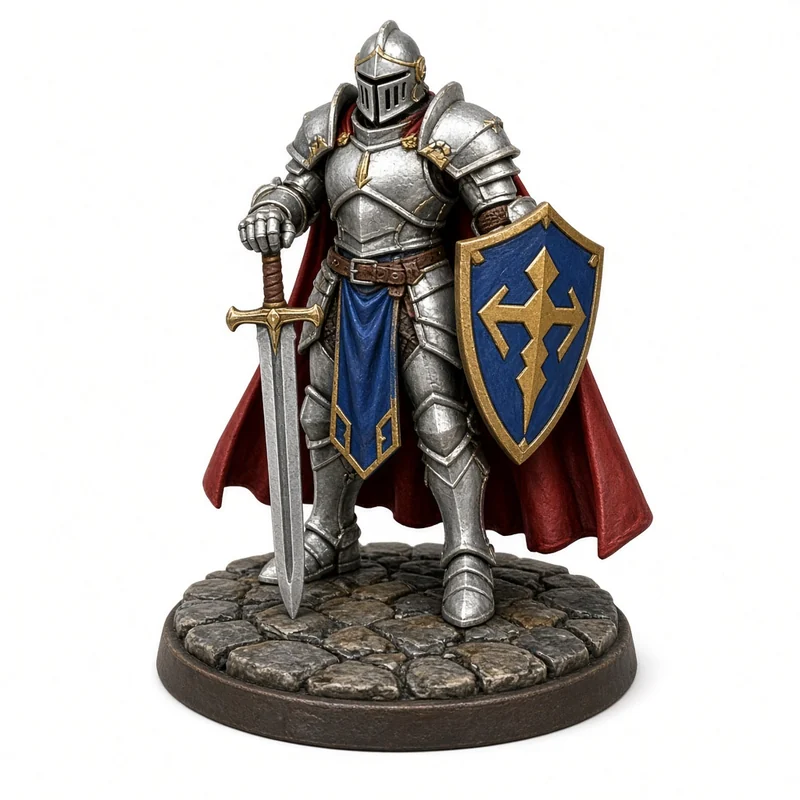
We ran those checks on five PrintPal generations made from AI-generated PNGs: a knight miniature, a cosplay helmet, a mushroom house, a toy rocket and a treasure chest. These are our numbers on our models, from the raw downloads, checked with the open-source trimesh library.
- triangles in the raw knight
- 998,810
- watertight body per model
- 1
- models with consistent winding
- 5 of 5
- the knight as a 3MF, vs 49.9 MB as binary STL
- 21.0 MB
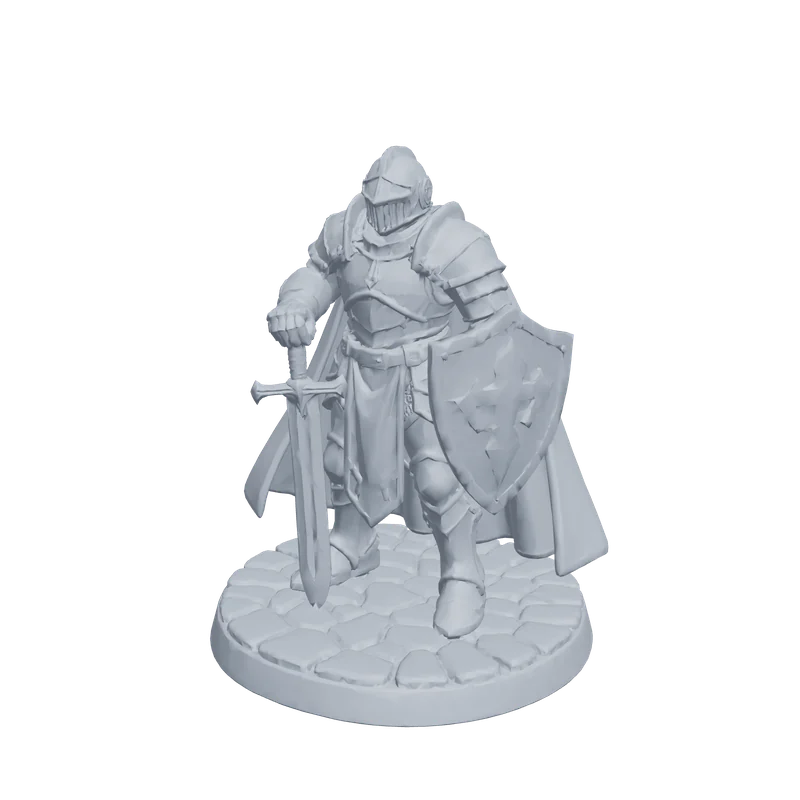
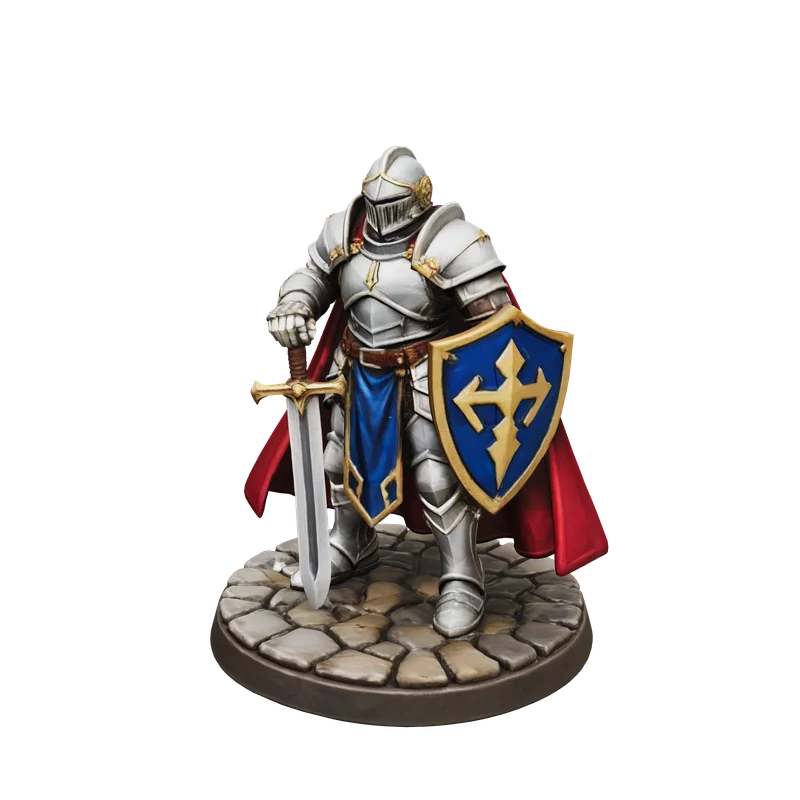
The 998,810-triangle knight exported with trimesh; the GLB is the download as it came from PrintPal. Use binary STL or 3MF; never ASCII STL for big meshes.
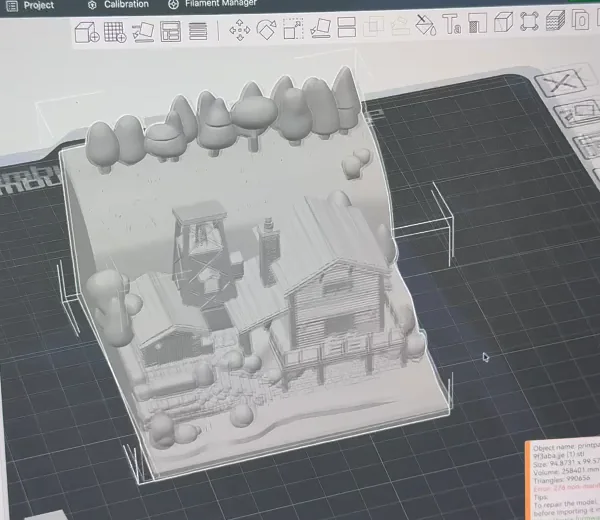
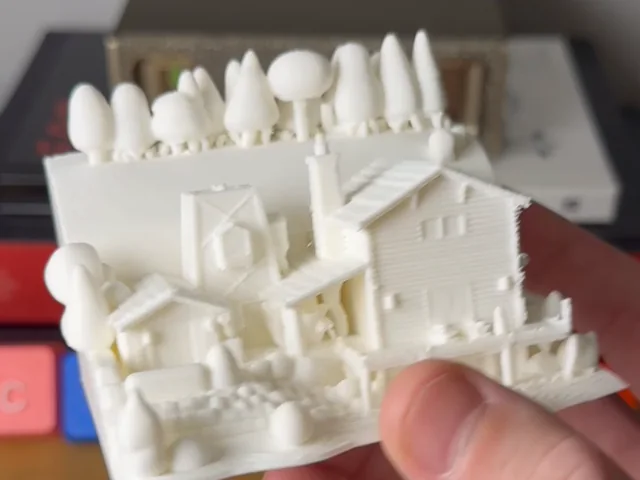
A generated cabin diorama went into Bambu Studio without repairs, then printed a few centimetres across.
Who owns what you generate
The license on a generated model decides whether you can sell prints, post the file or use it in a product. It varies by generator and by plan, so check it before you build a shop around one.
| Generator | Free plan output | Paid plan output |
|---|---|---|
| PrintPal (ours) | Personal use | Commercial rights (Pro, Studio) |
| Meshy | CC BY 4.0: commercial use with credit | Private, yours |
| Tripo | Public and non-commercial | Paid plans |
| Rodin | No unrestricted export or use | Commercial-use rights |
| Hi3D | No downloads, no commercial use | Commercial use |
| 3D AI Studio | Unclear | Private, yours, commercial use allowed |
| Sloyd | Personal use | Plus: commercial; reselling files needs Pro |
| Hunyuan3D 2.1 | Tencent claims no rights, but the license excludes the EU, UK and South Korea | — |
| TRELLIS.2 | MIT | — |
| SF3D / SPAR3D | Yours, free under $1M annual revenue | Enterprise license above $1M |
Running a generator on your own GPU
Open models are free to run and private by default, but they are research releases: no printability check, no scale, GLB output. Plan to convert, repair and size every result.
| Model | License | Hardware | Output | Watch out for |
|---|---|---|---|---|
| Hunyuan3D 2.1 | Tencent community license | 10 GB VRAM shape, 29 GB with texture | Textured mesh | Not licensed in the EU, UK or South Korea |
| TRELLIS.2 | MIT | NVIDIA GPU, 24 GB or more, Linux | GLB with PBR materials | Open, non-manifold surfaces |
| Stable Fast 3D / SPAR3D | Stability Community License | Not stated on the model cards | Textured GLB | Enterprise license above $1M revenue |
To print an open-model result: convert the GLB with the 3D model converter, scale it (GLB is in metres), close it with mesh repair, then slice.
From generated model to a good print
- Start with a clean input
One object, plain background, three-quarter view. Crisp toy-like shapes convert better than fur, glass or thin wires.
- Set the real size
Decide the height in millimetres and scale to it in the slicer or the 3D model viewer.
- Close the mesh
Run mesh repair even if the generator promises watertight output.
- Give it a flat base
Cut the bottom flat in the slicer, or orient the largest flat face down.
- Split if it is too big
Cut it into parts with the model splitter and glue after printing.
- Map colors to filaments
For an AMS, turn a color model into a multi-color 3MF with the AMS color converter.
- Slice and check
Preview every layer, add supports where needed, and print a small test first.
Each step is covered in more detail in our wiki article on making an AI 3D model printable.
Frequently asked questions
Which AI 3D model generator is best for 3D printing?
Our first pick is PrintPal: 10 free generations a month with STL and OBJ downloads, watertight single-body meshes in our tests, and multi-color 3MF on Pro for $10 a month. Meshy has the most print tools inside the generator (printability check, Auto Repair, Auto Split, multi-color) on its $20 Pro plan. Tripo has the most free credits if non-commercial use is fine.
Is there a free AI 3D model generator that exports STL?
Yes. PrintPal's free plan includes 10 generations a month with STL and OBJ downloads. Meshy's free plan allows 10 downloads a month of untextured Lite models. Tripo's free plan includes limited exports. Open models such as TRELLIS.2 are free but export GLB, which you convert to STL.
Are AI-generated 3D models watertight?
Not always. PrintPal's sample models were each one watertight body in our tests, and Meshy, Rodin, Hi3D and 3D AI Studio advertise watertight output or a repair step. Open models make no such promise. Check every model with a mesh repair tool before slicing.
Can AI generators make multi-color prints?
Yes. PrintPal Pro, Meshy, Hi3D, Rodin, 3D AI Studio and Sloyd can export color models as 3MF with regions mapped to filaments, for Bambu AMS or Creality CFS. PrintPal's AMS color converter also turns a color model into a multi-color 3MF.
Can I run an AI 3D model generator on my own computer?
Yes, with a large GPU. TRELLIS.2 (MIT) needs an NVIDIA GPU with at least 24 GB and Linux. Hunyuan3D 2.1 needs 10 GB of VRAM for shape and 29 GB with texture, and its license excludes the EU, UK and South Korea.
Can I sell prints of AI-generated models?
Only if the license allows it. PrintPal Pro and Studio include commercial rights, while the PrintPal Free plan is personal use. Free Meshy outputs are CC BY 4.0, so selling is allowed with credit. Free Tripo and Hi3D outputs are non-commercial; their paid plans include commercial rights.
Why is my AI model tiny in the slicer?
GLB files store sizes in metres and STL has no units, so slicers assume millimetres. A model exported in metres loads 1,000 times too small. Scale it by 1000, or check the size first in a 3D model viewer.
Sources and method
Prices, free tiers, export formats and licenses come from each vendor's own pricing page, documentation, GitHub repository or model card, checked on November 12, 2026, and listed below. Where a vendor's pages disagree we say so. Measurements are from PrintPal's own generations only (raw downloads analysed with trimesh, seams welded). We have not published scores for other generators; the 10-minute test above is how to compare them. PrintPal is our product, ranked first in this guide, and marked wherever it appears.
- PrintPal pricing
- Meshy pricing
- Meshy: free plan
- Meshy: why can't I download my model
- Meshy for 3D printing
- Tripo pricing
- Tripo: supported file formats
- Tripo: preparing models for 3D printing
- Hi3D pricing
- Hi3D: Split to Print guide
- Hyper3D (Rodin) pricing
- Hyper3D for 3D printing
- 3D AI Studio pricing
- 3D AI Studio: Export for 3D Printing
- Sloyd pricing
- Sloyd for 3D printing
- MakerWorld MakerLab credit guide
- Hunyuan3D 2.1 on GitHub · README and license
- TRELLIS.2 on GitHub · README and license
- Stable Fast 3D model card
- SPAR3D model card
- Stability AI license
- Luma 3D Capture on the App Store · Genie sunset note
- Gunderson Dettmer: CSM acquisition by Google
Spotted something out of date? Tell us and we will re-check it.