By the PrintPal team
On this page
- The short answer
- Where AI actually helps a 3D print
- The shortlist: 8 AI tools worth using
- Generating models from a picture or a prompt
- Designing functional parts with exact dimensions
- Repairing, splitting and coloring a model
- AI inside slicers
- AI failure detection: stop the spaghetti early
- AI assistants that look things up instead of guessing
- Selling prints: listings and pricing
- What AI still cannot do for your printer
- FAQ
- Sources and method
Key takeaways
- AI is dependable at two steps today: generating decorative models from an image or prompt, and spotting failed prints on a camera. Elsewhere it is early, or not needed at all.
- For a model you plan to print, watertight output, real STL downloads and multi-color 3MF matter more than the prettiest render. PrintPal gives you all three, with 10 free generations a month; Meshy packs the most prep tools into the generator, mostly on its $20 Pro plan.
- For failure detection on a printer without its own AI camera, SimplyPrint gives the most for free: 2 printers, 12 detection hours a month, and Bambu Lab and Prusa support without OctoPrint.
- Functional parts with exact dimensions need text-to-CAD, not a mesh generator: Zoo, Adam or PrintPal's CAD agent, which writes OpenSCAD you can edit.
- Mesh repair does not need AI. Free algorithmic tools close holes and fix flipped normals in seconds.
- Read the output license before you sell: PrintPal's Free plan is personal use (Pro adds commercial rights), Meshy's free models are CC BY 4.0, and Tripo's free models are non-commercial.
The short answer
If you try only three AI tools for 3D printing, make them an AI model generator for decorative prints (PrintPal, or Meshy), a text-to-CAD tool for functional parts (Zoo, Adam or PrintPal's CAD agent), and AI failure detection for long prints (built into recent Bambu Lab and Creality printers, or SimplyPrint for everything else). AI inside slicers is still early, and mesh repair does not need AI at all.
| Stage | What AI does today | Our pick | Free way to start | Maturity |
|---|---|---|---|---|
| Generate a model | Image or text to a printable mesh | PrintPal 3D generator | PrintPal: 10 generations a month with STL | Ready |
| Design exact parts | Text to parametric CAD | Zoo | Zoo: 20 AI minutes a month | Useful |
| Repair the mesh | Nothing you need: geometry algorithms do it | Mesh repair | Free in the browser | No AI needed |
| Split colors | Map a colored model to filaments | PrintPal multi-color 3MF | AMS color converter | Useful |
| Slice | Predict failures, tune settings | Helio in Bambu Studio | Creality Print AI Edition (beta) | Early |
| Watch the print | Spot spaghetti and pause the printer | Your printer's own camera, or SimplyPrint | SimplyPrint: 2 printers, 12 AI hours a month | Ready |
| Troubleshoot | Explain a defect and the fix | An assistant with the PrintPal MCP server | Free, no API key | Useful |
| Sell | Write listings, price prints | Listing generator | Print cost calculator | Useful |
Where AI actually helps a 3D print
Every print goes through the same steps, with or without AI: get a model, adjust it or design one, check the mesh, assign colors, slice, print and watch, fix what went wrong and, for some of us, sell the result. The map at the top of this page shows where AI tools exist in November 2026 and how far we would trust each one. (How the generators themselves work is explained in our AI for 3D printing primer.) We use four labels:
- Ready: you can rely on it for real prints today.
- Useful: saves time, but check what it gives you.
- Early: promising, but in beta or narrow.
- No AI needed: ordinary software already solves it well, so AI adds cost without adding much.
Most "AI for 3D printing" lists, including the one from Meshy this page answers, are really lists of model generators. Generators matter, but a print fails far more often at the first layer, in the supports or in a wet spool than in the model. That is why this guide covers the whole pipeline, and why it is honest about the steps where AI does little.
The shortlist: 8 AI tools worth using
These are the tools we would recommend to a friend with a printer, ranked by how much they change the outcome of a real print for the money. Two are ours, and they are marked.
1. PrintPal AI 3D generator
Best for turning an image or prompt into a print-ready model
Ten free generations a month with real STL and OBJ downloads and no credit card. In our own tests every sample model came out as one watertight body that went straight into the slicer, and Pro adds a multi-color 3MF for Bambu AMS at half the price of Meshy Pro. Repair, splitting, conversion and color painting are free PrintPal browser tools, so every step after the generation is free too.
- Free tier
- 10 generations a month at Draft quality, STL and OBJ downloads
- Paid
- Pro $10/mo ($8/mo yearly), 200 generations; Studio $25/mo, 500
- Exports
- STL and OBJ; GLB, PLY and multi-color 3MF (2 to 8 colors) on Pro
- Output license
- Free: personal use. Pro and Studio: commercial rights
- Real STL downloads on the free plan
- Watertight, single-body meshes in our tests
- Multi-color 3MF for $10 a month
- Free browser tools for the next steps
- Draft quality only on Free
- No commercial use on Free
- Splitting is a separate step in the model splitter
2. Meshy
Best for print prep inside the generator, on a paid plan
Meshy puts the most 3D-printing steps inside the generator itself: a printability check (watertight, holes, non-manifold edges), Auto Repair, Auto Split into watertight parts and multi-color output for Bambu AMS and Creality CFS, with STL and 3MF export. The print features that matter most sit behind the $20 Pro plan.
- Free tier
- 100 credits a month; 10 downloads a month, untextured Meshy 6 Lite models only
- Paid
- Pro $20/mo, Premium $40/mo, Ultra $100/mo
- Exports
- STL, 3MF, OBJ, GLB, FBX, USDZ, BLEND
- Free output license
- CC BY 4.0: commercial use allowed with credit
- Printability check and Auto Repair before you download
- Multi-color for AMS and CFS, split into parts
- Text, image, multi-view and chat inputs
- Free downloads are untextured Lite models only
- Multi-color print, Send to Slicer and Add Platform need Pro or higher
- The pricing page shows new-user discounts; budget for the list price
3. Zoo Design Studio
Best for text-to-CAD you keep editing as real CAD
Zoo's AI agent builds parts in a full CAD program, and manual CAD modeling is unlimited on every plan; only AI and API time is metered. The right pick when a part has to fit something.
- Free tier
- 20 AI minutes a month, unlimited manual CAD
- Paid
- Plus $20/mo or $99/yr (about 400 minutes); Pro $99/mo
- Best at
- Brackets, enclosures, mechanical parts
- Real CAD, not a mesh
- Unlimited manual modeling on Free
- API and MCP access
- A learning curve if you have never used CAD
- The Free plan's data-training terms are worded two ways on the pricing page
4. PrintPal AI CAD agent
Best for quick functional parts with exact dimensions
Describe a part with real measurements and the agent writes parametric OpenSCAD with a live preview. Editing, previewing and exporting run free in your browser; you pay only for AI generations, and most designs cost under $1.
- Pricing
- Credits pay-as-you-go, or a $20/mo membership
- Exports
- STL, 3MF, STEP and SCAD
- Output
- Readable OpenSCAD with named parameters
- Change a dimension without another AI call
- Exports are free
- Organic shapes are out of scope: use a mesh generator for those
- Editing by hand means learning a little OpenSCAD
5. SimplyPrint
Best for AI failure detection on almost any printer
Watches your printer's camera for spaghetti, warping and blobs, then alerts you or pauses the print. Unlike Obico it does not need OctoPrint for Bambu Lab or recent Prusa printers: Prusa connects directly, Bambu Lab through SimplyPrint's own small client on any always-on computer or Raspberry Pi, and Klipper and OctoPrint printers work too. The free plan covers two printers, and the same account adds a browser slicer, a print queue and filament tracking.
- Free tier
- 2 printers; 12 AI detection hours a month, shared across the account; 15 cloud slices a month
- Unlimited AI
- An AI license is $3.60/mo per watched printer, on any plan including Free
- Auto pause or cancel
- Basic ($5.99/mo) and higher; Free sends alerts
- Detects
- Spaghetti, warping and blobbing
- No OctoPrint needed for Bambu Lab or recent Prusa printers
- More free printers and detection hours than Obico
- Images train the model only if you opt in
- Cloud only: no self-hosting outside the Enterprise plan
- Automatic pausing needs a paid plan
6. Obico
Best for open-source detection you can self-host
Open-source failure detection that watches your webcam and pauses the print when it sees spaghetti. It runs with OctoPrint or Klipper, and the whole server can be self-hosted, so your camera images never leave your network.
- Free tier
- 1 printer, 10 AI detection hours a month, streaming capped at 5 FPS
- AI Premium
- $8.99/mo, or $6.99/mo billed yearly, with 50 hours a month
- Self-hosted
- AGPL-3.0 server
- Self-hosting option
- Adds detection to older printers
- The next-generation model is AI Premium only (since May 1, 2026)
- Needs a webcam plus an OctoPrint or Klipper host; no direct Bambu Lab connection
7. Bambu Lab built-in detection
Best for Bambu owners who want detection with no subscription
Runs on the printer, not in the cloud. Bambu documents it for the X1 series, P2S, H2D and H2C (which add a nozzle camera that catches clumping and printing in mid-air), H2S and X2D.
- Cost
- Included with the printer
- Documented on
- X1, P2S, H2D, H2C, H2S, X2D
- Not listed for
- A1 and P1 series
- Nothing to install or pay
- Nozzle camera on H2D and H2C sees problems early
- On H2D and H2C, AI detection switches off if you slice with third-party software
8. Helio
Best for predicting failures before you print
Built into Bambu Studio: Assess predicts where a print is likely to fail, and Enhance adjusts settings to avoid it. Helio also maintains its own OrcaSlicer fork.
- Enhance
- $9.99/mo or $84.99/yr, non-commercial
- Business
- Biz Plus $29.99/mo
- Works in
- Bambu Studio; Helio's OrcaSlicer fork
- Catches problems before plastic is spent
- No extra app inside Bambu Studio
- Paid for the useful part
- Not in mainline OrcaSlicer, PrusaSlicer or Cura
Generating models from a picture or a prompt
This is where AI is strongest. Feed in a photo, a drawing or a sentence and get a 3D model in about a minute.
What you get is a triangle mesh: good for figures, mascots, toys, busts and decor, and the wrong tool for anything that must fit or carry load. For printing, the texture barely matters; the shape, the scale and whether the mesh is closed decide whether it prints.
| Generator | Free tier | STL / 3MF | Print features | Free output license |
|---|---|---|---|---|
| PrintPal (ours) | 10 generations a month with STL | Yes / Pro | Watertight output, AMS multi-color 3MF | Personal use |
| Meshy | 100 credits a month, 10 Lite downloads | Yes / Yes | Printability check, repair, split, multi-color | CC BY 4.0 |
| Tripo | 200 credits a month (about 13 models) | Yes / Yes | AI segmentation, Fill Parts | Non-commercial |
| Rodin (Hyper3D) | Generate free, pay $1.50 per credit to keep | Yes / Yes | Watertight claim, Bang to Parts, color 3MF | Paid plans for commercial use |
| Hi3D | 100 one-time credits, no downloads | Yes / Yes | Split to Print, multi-color, relief | No commercial use on Free |
| Sloyd | 1 generation a day | Paid plans | 3D-print preset, parts with pins | Personal use |
From each vendor's own pricing page, November 12, 2026. Full reviews, open-source options and our printability test are in the AI 3D model generator guide.
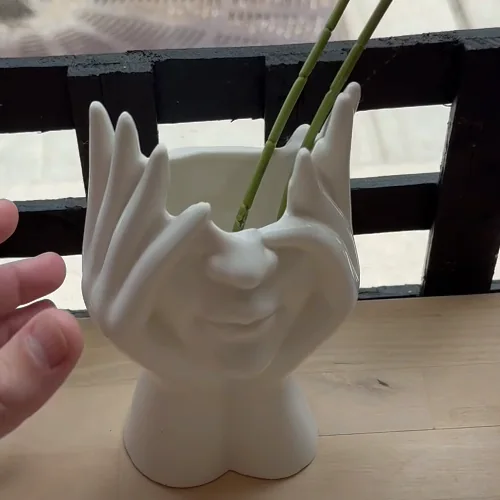
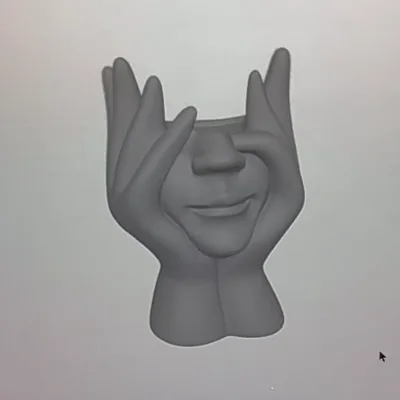
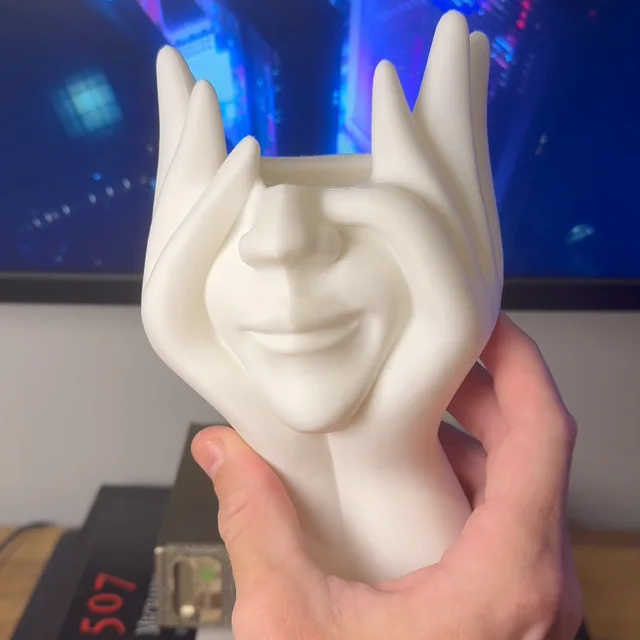
One phone photo to a printed planter with PrintPal's image-to-3D. Real output, printed in white PLA.
Designing functional parts with exact dimensions
Mesh generators guess shapes, so they cannot promise a 22.0 mm hole. For brackets, enclosures, adapters and replacement parts use text-to-CAD, which builds geometry from the numbers you give it.
| Tool | What it makes | Free | Paid |
|---|---|---|---|
| PrintPal CAD agent (ours) | Parametric OpenSCAD with a live preview; STL, 3MF, STEP export | Editing and export free; pay per AI generation | $20/mo membership |
| Zoo Design Studio | Parts in a full CAD program | 20 AI minutes a month | Plus $20/mo or $99/yr |
| Adam | AI CAD in the browser (adam.new) | A light daily quota on the Lite model | Pro $40/mo, Max $200/mo |
| CADAM | Adam's open-source text-to-CAD app | Free, GPL-3.0, run it yourself | — |
| Backflip | Parametric CAD from drawings, scans or photos; Fusion add-in | Limited weekly usage | Builder $20/mo |
Text-to-CAD works best when you write the prompt like a drawing: the critical dimensions, what the part attaches to, the screw sizes, which face sits on the bed. Add clearance where parts meet. On FDM printers 0.2 to 0.4 mm per mating face is a common starting point, but print a small test piece before the full part.
Wall bracket for a 22 mm diameter rod.
Base plate 60 x 30 x 5 mm with two countersunk holes for M4 screws, 40 mm apart.
Rod clip centred 25 mm from the wall, 3 mm walls, 0.3 mm clearance around the rod.
Print flat side down with no supports.
Every number that matters is in the prompt. Vague prompts ("a strong bracket") get vague parts.
Repairing, splitting and coloring a model
Closing holes, merging duplicate vertices and fixing flipped normals are solved problems in geometry software. Any tool that sells "AI mesh repair" is mostly running the same algorithms, so use a free one. AI does help with color: PrintPal's Pro plan exports a painted 3MF with 2 to 8 colors, and Meshy, Hi3D and 3D AI Studio can split a colored model into filament regions.
 Mesh repair
Close holes, fix flipped normals and check a mesh is watertight before slicing.
 3D model viewer
Open STL, OBJ, 3MF and GLB files to check size and shape.
 3D model converter
Convert between STL, OBJ, 3MF, GLB and PLY in the browser.
 3D model splitter
Cut a model that is too big for your bed into parts that fit.
 AMS color converter
Turn a full-color model into a multi-color 3MF with a filament per region.
 3D model painter
Paint regions of a model and export a multi-color 3MF.
AI inside slicers
Two mainstream slicers ship AI features in November 2026: Creality Print (an "AI Edition" beta since version 7.2) and Bambu Studio through its Helio integration. We found no AI features in the release notes of OrcaSlicer 2.5.0, PrusaSlicer 2.9.7 or Cura 5.14.0.
| Slicer | Version | AI features | Cost |
|---|---|---|---|
| Creality Print | 7.3.1 | AI Edition beta: model search in plain English, error detection with auto repair, AI filament mapping, print-risk analysis that adds supports | Free |
| Bambu Studio | 2.9.1 | Helio Assess and Enhance | Free; Enhance $9.99/mo |
| OrcaSlicer | 2.5.0 | None (this release adds Python plugins); Helio ships a fork | Free |
| PrusaSlicer | 2.9.7 | None | Free |
| UltiMaker Cura | 5.14.0 | None | Free |
| Lychee Slicer (resin) | 8.0.4 | AI-powered auto-orientation | Free Lite; Plus is paid |
AI failure detection: stop the spaghetti early
If you print anything longer than a couple of hours, AI failure detection is worth having. Recent Bambu Lab and Creality printers include it on the printer. For anything else, SimplyPrint adds it through any camera: free for two printers with 12 detection hours a month, and it catches warping and blobs as well as spaghetti. Obico is the open-source choice if you want to self-host.
| Option | AI detection | Runs on | Cost | Any printer |
|---|---|---|---|---|
| Bambu Lab X1, P2S, H2D, H2C, H2S, X2D | Yes | The printer | Included | No |
| Creality K1C, K1 Max, K2 Plus | Yes | The printer | Included | No |
| SimplyPrint Free | Yes | SimplyPrint cloud | 2 printers, 12 AI hours a month; alerts (auto-pause from Basic, $5.99/mo) | Yes |
| SimplyPrint AI license | Yes | SimplyPrint cloud | $3.60/mo per watched printer, no hour cap | Yes |
| Obico Free | Yes | Obico cloud or your own server | 1 printer, 10 AI hours a month | Yes |
| Obico AI Premium | Yes | Obico cloud | $8.99/mo or $6.99/mo yearly, 50 hours | Yes |
| Prusa Connect | No | Prusa cloud | Free with Prusa printers (camera only) | No |
Twelve free hours a month covers about three long prints, so most hobbyists can try SimplyPrint without paying. On the Free plan it alerts you with a snapshot; to have it pause or cancel the print by itself you need Basic or higher. Unlimited detection costs $3.60 a month per watched printer, less than half of Obico's AI Premium. Bambu Lab's H2D and H2C go further with a nozzle camera that spots clumping and printing in mid-air, but only when the file was sliced in Bambu Studio.
AI assistants that look things up instead of guessing
General chatbots explain stringing or warping well, but they invent model links, print settings and prices. Connecting them to real tools fixes that. With the Model Context Protocol (MCP), an assistant such as Claude, ChatGPT or Cursor calls a tool, gets a real answer and quotes it.
Here is a real exchange with the PrintPal MCP server connected. The model, its stats and the cost breakdown are what the tools returned on November 12, 2026.
search_3d_modelsquery: "headphone stand"Here's a good one. The author prints it with no supports:
calculate_print_costweight_grams: 86, print_hours: 3.2About $1.85: $1.72 of filament, $0.05 of electricity and $0.09 set aside for failed prints, at a $20 spool, a 120 W printer and $0.12 per kWh.
search_3d_models and calculate_print_cost.The server is free and needs no API key for searching models or running the calculators. Setup takes a minute: see the guides for Claude, ChatGPT and Cursor, or the MCP server page for any other client.
Selling prints: listings and pricing
If you sell prints, AI is handy for the words and useless for the maths. Let a model draft the listing, then price from real numbers: filament grams and hours from the slicer, your electricity rate and a failure allowance.


What AI still cannot do for your printer
- Calibrate it. Flow, pressure advance and first-layer height come from test prints and a ruler.
- Promise dimensions from a mesh generator. Use text-to-CAD or real CAD for anything that must fit.
- Judge safety. Whether a part is food-safe, carries load or survives a hot car is your call, and depends on material and settings more than on the model.
- Fix the hardware. A loose belt, a worn nozzle or a wet spool looks like a "bad model" to every AI tool.
- Replace supervision. Detection catches failures; it does not make unattended printing safe.
Used where it is strong, AI saves real hours: a figure you could not sculpt, a bracket designed from one sentence, a ruined overnight print caught at layer 40. Used everywhere else, it mostly adds a subscription.
Frequently asked questions
What is the best AI tool for 3D printing?
It depends on the step. For generating decorative models, our first pick is PrintPal: 10 free generations a month with STL downloads and watertight output in our tests. Meshy has the most prep tools inside the generator on its $20 Pro plan. For functional parts, use text-to-CAD such as Zoo or the PrintPal CAD agent. For long prints, AI failure detection (built into recent Bambu Lab and Creality printers, or SimplyPrint for everything else) saves the most filament.
Can AI make STL files for 3D printing?
Yes. PrintPal, Meshy, Tripo, Rodin, Hi3D and others export STL from an image or text prompt. Check that the mesh is watertight and the right size before slicing; free tools like PrintPal's mesh repair and 3D model viewer do both in the browser.
Is there a free AI 3D model generator for 3D printing?
Several have free tiers. PrintPal includes 10 generations a month with STL and OBJ downloads. Meshy gives 100 credits a month with 10 downloads of untextured Lite models. Tripo gives 200 credits a month for non-commercial use. Hi3D's free trial does not allow downloads.
Can AI design functional parts with exact dimensions?
Yes, with text-to-CAD tools rather than mesh generators. Zoo, Adam and the PrintPal CAD agent build parts from the dimensions you give them. Put every critical number in the prompt and print a test piece to check fit.
Does any slicer use AI?
Creality Print has an AI Edition beta (since 7.2) with model search, error detection and print-risk analysis, and Bambu Studio integrates Helio to predict failures and adjust settings. OrcaSlicer 2.5.0, PrusaSlicer 2.9.7 and Cura 5.14.0 list no AI features.
Is AI failure detection worth it?
For prints longer than a couple of hours, yes. It is included on Bambu Lab X1, P2S, H2D, H2C, H2S and X2D printers and Creality K1C, K1 Max and K2 Plus. SimplyPrint adds it to almost any other printer, free for two printers and 12 detection hours a month, and catches warping and blobs as well as spaghetti. Obico is the open-source option you can self-host.
What is the best alternative to Obico?
SimplyPrint. Its free plan covers two printers and 12 AI detection hours a month (Obico Free: one printer, 10 hours), it detects spaghetti, warping and blobbing, and it supports Bambu Lab and recent Prusa printers without OctoPrint. Unlimited detection is $3.60 a month per printer. Choose Obico if you want to self-host everything.
Can I sell prints of AI-generated models?
It depends on the generator's license. The PrintPal Free plan is personal use, and Pro and Studio include commercial rights. Free Meshy outputs are CC BY 4.0, so selling is allowed with credit. Free Tripo and Hi3D outputs are non-commercial. Paid plans on these services include commercial rights.
Sources and method
We checked every price, free tier, export format and license on the vendor's own pricing page, documentation or GitHub repository on November 12, 2026; those pages are listed below. We did not benchmark other companies' generators. Where we show output it is PrintPal's own, and we say so. PrintPal makes the 3D generator, CAD agent, MCP server and browser tools named here; they are marked as ours wherever they appear.
- PrintPal pricing
- Meshy pricing · plans, exports, free-output license
- Meshy: what is included on the free plan
- Meshy for 3D printing · printability check, repair, multi-color, 3MF
- Tripo pricing
- Hi3D pricing
- Hyper3D (Rodin) pricing
- Sloyd pricing
- Zoo pricing
- Adam pricing
- CADAM on GitHub · GPL-3.0
- Backflip pricing
- SimplyPrint pricing · plans and the AI Camera Detection add-on
- SimplyPrint: AI failure detection · 12 free hours a month, detection types, auto-pause on Basic and higher
- SimplyPrint setup guide · Bambu Lab via the SimplyPrint Client
- Obico: upgrade to AI Premium
- Obico: next-gen AI failure detection
- Obico: Bambu Lab printers through OctoPrint
- Bambu Lab wiki: spaghetti detection
- Bambu Lab wiki: H2D/H2C intelligent detection
- Creality wiki: AI detection
- Prusa Connect
- Creality Print 7.2.0 release notes · AI Edition beta
- Bambu Studio release notes (Helio)
- Helio pricing
- OrcaSlicer 2.5.0 release notes
- UL 200B: 3D printer safety guidance
- PrintPal CAD agent pricing
Spotted something out of date? Tell us and we will re-check it.