About this video
What Is the PrintPal City Map Generator?
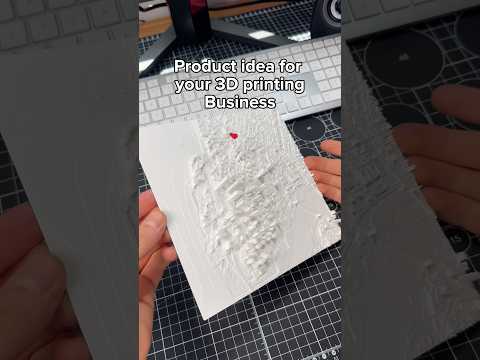
The PrintPal city map tool is a free, browser-based utility that transforms real-world geographic data into printable 3D scale models. Instead of starting from scratch in CAD software, you can type the name of any city—or pan and zoom the interactive map to a specific neighborhood, landmark, or terrain feature—and instantly generate a watertight STL file optimized for 3D printing.
This makes it one of the most accessible 3D printing tools available for hobbyists, urban planners, educators, and anyone who wants a tangible keepsake of a meaningful place.
How to Make a 3D Printed Scale Map
Getting started takes only a few steps:
- Search or navigate to your chosen city in the PrintPal map interface
- Adjust the settings to control the model footprint, vertical exaggeration, base thickness, and overall scale
- Preview the result in 3D to confirm the terrain looks right
- Export the optimized mesh as an STL or 3MF file
- Slice and print using your usual workflow (Cura, PrusaSlicer, Bambu Studio, etc.)
The mesh is pre-optimized, meaning non-manifold edges and tiny floating artifacts have already been cleaned up to save you repair time in tools like Meshmixer.
Tips for a Better 3D Printed City Map
- Choose the right material: PLA works fine for desk displays, but PETG or resin gives crisper detail for fine streets and coastlines
- Print at 0.12 mm layer height or finer to capture road networks and elevation changes
- Use a matte or textured filament to reduce glare on large flat areas like water and plains
- Add a raised border or label by post-processing with a marker, or by pausing the print to drop in printed text
- Print at an angle for mountainous regions to highlight elevation without excessive layer lines on the peaks
Frequently Asked Questions
Is the PrintPal city map tool really free?
Yes, the tool is free to use with no account required. You only need a 3D printer to bring the file to life.
What file format do I get?
The export produces a standard STL file, which is compatible with virtually every slicer and 3D printer on the market.
Can I print very specific neighborhoods?
Absolutely. Pan and zoom into any area—a single district, a hiking trail, or even a famous stadium—before exporting.
How big should I print my city map?
A 1:50,000 scale is a popular sweet spot for desktop models, but the settings panel lets you scale up or down depending on your bed size and the level of detail you want.