About this video
What Is a 3D Scale Map?
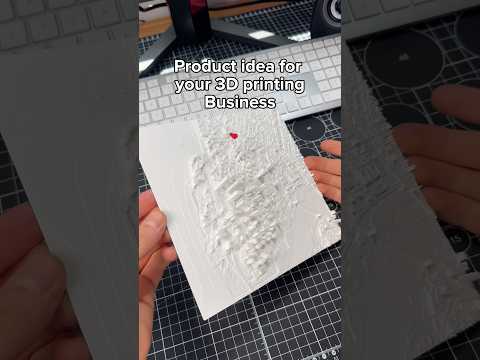
A 3D scale map is a physical, printable model of a real-world location scaled down so it fits on a desktop, shelf, or display case. Unlike flat paper maps, a 3D printed scale map preserves the proportions of streets, buildings, parks, rivers, and elevation, giving you a tactile representation of a city or region. They are popular as gifts, architectural references, travel souvenirs, classroom models, and urban planning aids.
How to Make a 3D Scale Map with PrintPal
PrintPal's Scale Map Maker is a browser-based tool that turns geographic data into a 3D print-ready model in just a few clicks. Here is the workflow shown in the video:
- Open the tool: Navigate to the Scale Map Maker on PrintPal from any desktop or mobile browser.
- Search or pan: Type a city name into the search bar, or drag the map to pan around the world until you find your area of interest.
- Select your region: Draw or adjust a bounding box around the area you want to model. Smaller regions print faster and reveal more architectural detail.
- Choose your options: Toggle terrain elevation on or off, and decide whether to include bodies of water such as rivers, lakes, and coastlines.
- Generate the model: PrintPal automatically optimizes the geometry for 3D printing, handling hollowing, wall thickness, and overhangs so the file is ready to slice.
- Download and print: Export the STL or similar file and send it to your slicer. The model works with FDM, SLA, and resin printers.
Tips for the Best 3D Printed City Map
- Pick the right scale. A scale around 1:10,000 to 1:50,000 keeps individual streets visible while still capturing the overall city shape.
- Use a textured build plate. Maps have large flat areas that benefit from a PEI sheet or a brim to prevent warping.
- Print in two colors. Print the base (terrain) in one filament and the water features in a translucent blue for a striking finish.
- Sand and paint. Light sanding with 220-grit paper removes layer lines, and a matte sealant protects the finished piece.
- Consider resin for detail. If your map includes fine architectural elements, a resin printer will capture sharper edges.
Frequently Asked Questions
Do I need 3D modeling experience to use the Scale Map Maker?
No. The tool is designed for beginners — you only need to search, select, and click generate.
Can I include elevation and water?
Yes. Both terrain height data and bodies of water can be toggled on before generating the model.
What file format is exported?
The tool outputs a 3D print-optimized file that is compatible with popular slicers like Cura, PrusaSlicer, and Bambu Studio.
Which printers work best?
Any FDM or resin printer will work. Larger maps may require a print volume of at least 200 x 200 mm.
Why Print a Scale Map?
Custom 3D printed maps make memorable gifts for travelers, realtors, and city lovers. They also serve as unique educational tools, letting students explore urban geography by holding the city in their hands.