 Free OrcaSlicer plugin · No camera needed
PrintPal Timelapse: 3D printing timelapse videos straight from your slice
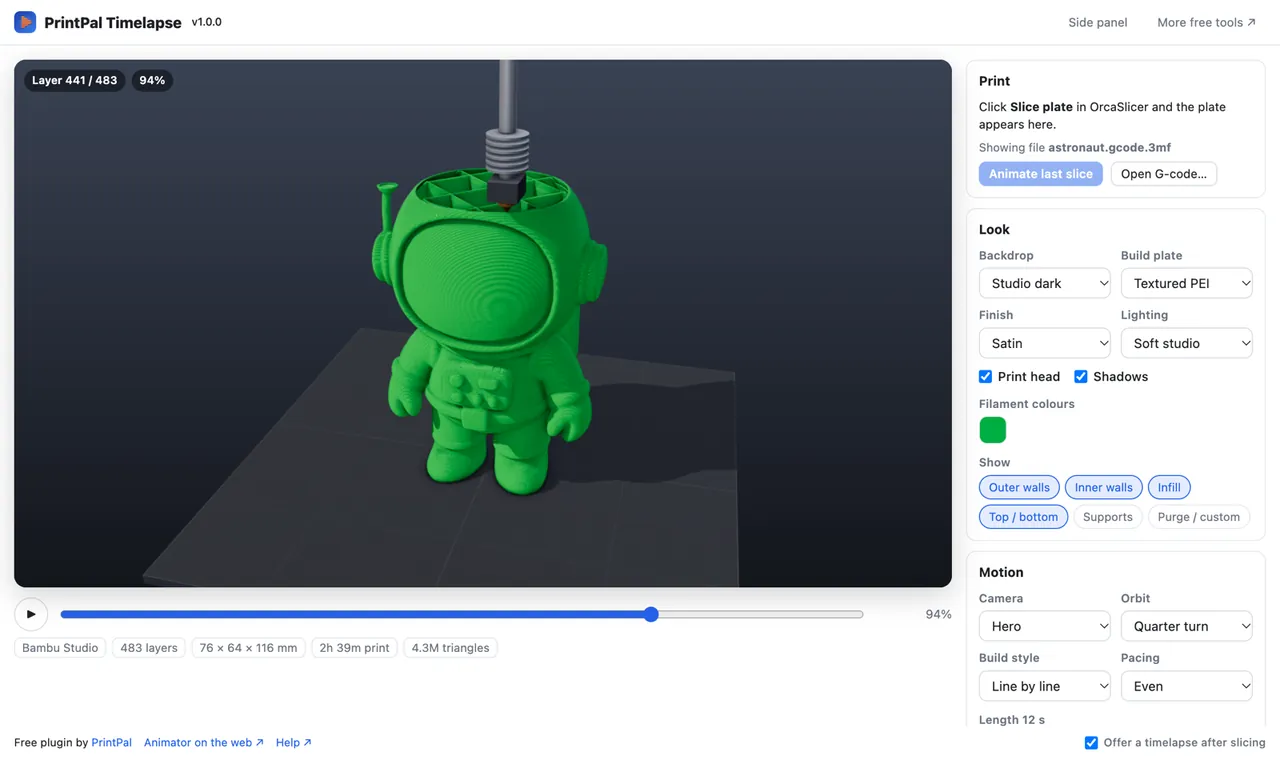
Slice, press Render video, post. The plugin reads the G-code OrcaSlicer just exported and renders a realistic print timelapse with a moving print head, studio lighting and an orbiting camera, before you even start the print.
- Free
- No account
- No camera
- G-code never uploaded
What is PrintPal Timelapse for OrcaSlicer?
PrintPal Timelapse is a free OrcaSlicer plugin that turns the plate you just sliced into a realistic 3D printing timelapse video. Instead of filming the printer, it renders the real toolpaths from your G-code (walls, infill, supports, every layer height, line width and filament colour) as solid extrusion beads on a build plate, with a moving print head, studio lighting, shadows and an orbiting camera.
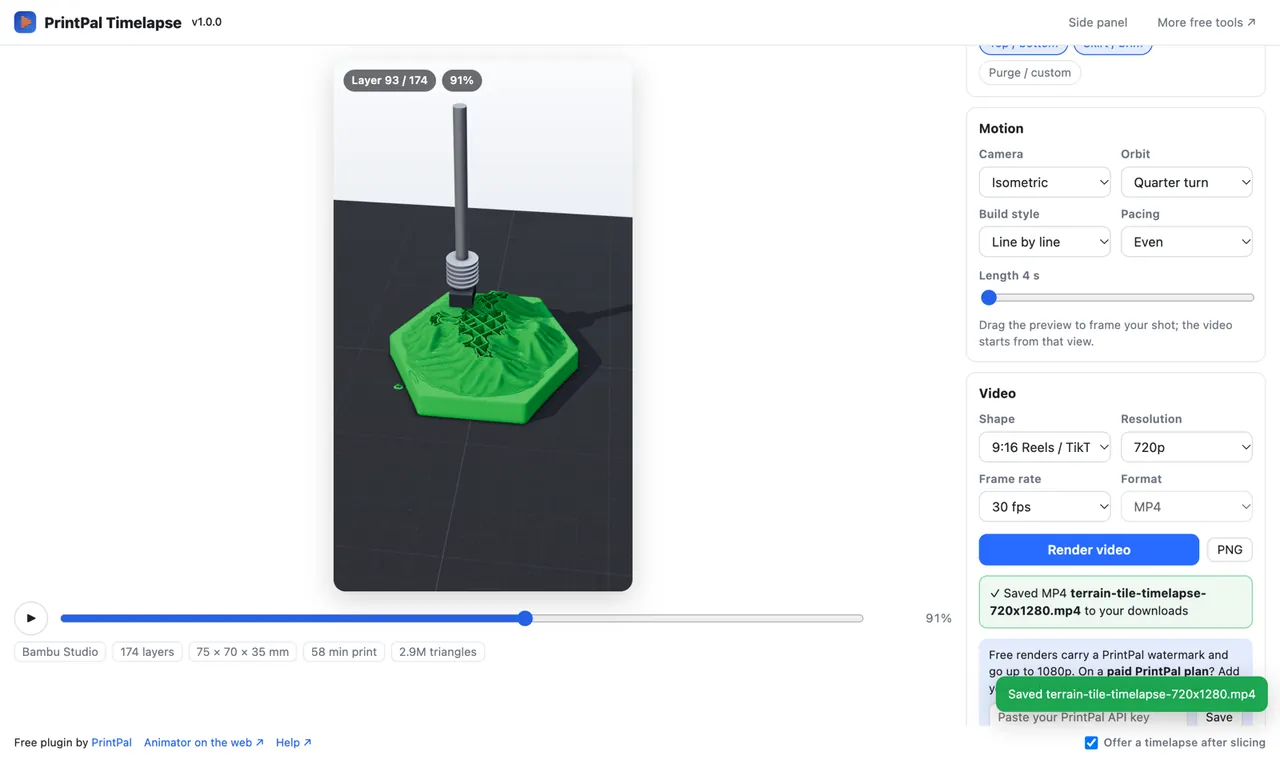
Videos export as MP4 (H.264) in 16:9, 9:16 for Reels, TikTok and Shorts, or 1:1, at 720p or 1080p and 30 or 60 fps. Rendering happens on your computer, so your G-code and videos are never uploaded. A paid PrintPal plan removes the small corner watermark and unlocks 1440p and 4K.
Updated October 27, 2026 · Made by PrintPal
At a glance
- OrcaSlicer version
- 2.5.0 or newer (Python plugin system)
- Version
- 1.0.0
- Price
- Free up to 1080p with a small watermark. Paid PrintPal plan: no watermark, 1440p and 4K.
- Output
- MP4 (H.264) and PNG stills
- Aspect ratios
- 16:9, 9:16 (Reels / TikTok / Shorts), 1:1
- Length
- 4 to 60 seconds
- Opens
- The current slice, any .gcode, Bambu / Orca .gcode.3mf
- Uploads
- None. Rendered locally with WebGL.
What PrintPal Timelapse for OrcaSlicer can do
Your real toolpaths
Walls, infill, top and bottom skins, supports, every layer height, line width and filament colour come straight from your slice.
A studio look
Rounded extrusion beads on textured PEI, smooth PEI or glass, soft, dramatic or bright lighting, matte to silk finishes and editable filament colours.
Camera and motion
Hero, front, side, isometric, low-angle or top-down presets, a quarter, half or full orbit, or drag the preview to frame your own shot.
Line by line or layer by layer
Pace the build evenly or by real print time, and hide supports or other features for a clean reveal.
Ready for social
9:16 for Reels, TikTok and YouTube Shorts, 16:9 for YouTube, 1:1 for feeds. PNG stills of any frame too.
Offered after every slice
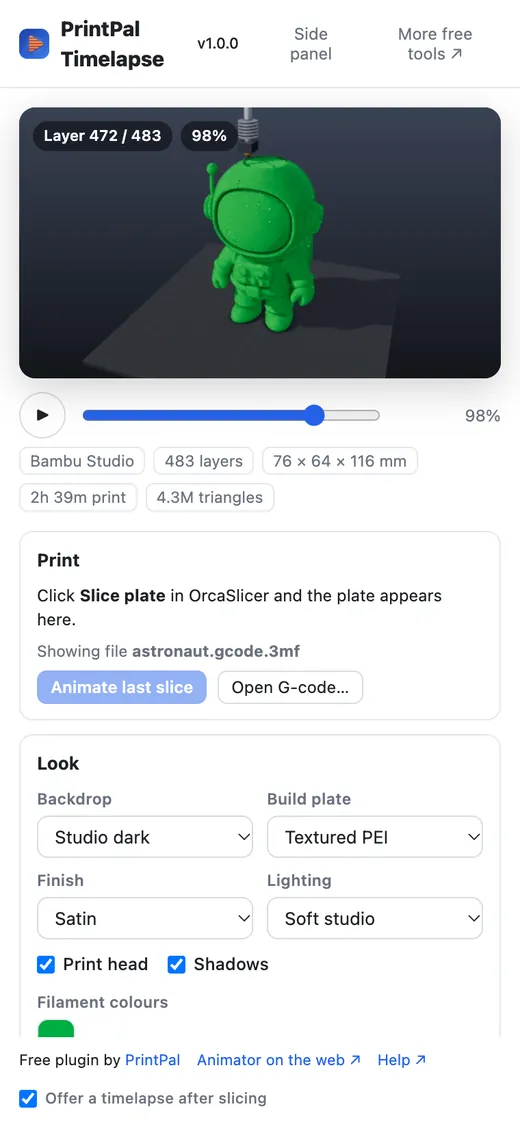
A once-per-session "Make timelapse" notification opens the studio with the slice already loaded. Switch it off any time.
PrintPal Timelapse for OrcaSlicer in action

How to install PrintPal Timelapse
- Download printpal_timelapse.py.
- In OrcaSlicer 2.5 or newer open File → Plugins → Add local plugin and pick the file.
- Tick Activate. Allow the one-time create a background thread prompt when the studio first opens.
- Slice a plate and click Make timelapse in the notification, or open the Timelapse tab (Speed Dial → Go to tab → Timelapse).
- Press Render video. The MP4 is saved to your Downloads folder and Show in Finder / Explorer reveals it.
Already using the full PrintPal plugin for OrcaSlicer? It includes this timelapse studio, so you do not need both.
PrintPal Timelapse for OrcaSlicer 1.0.0
- Windows, macOS, Linux (OrcaSlicer 2.5+)
- Orca Cloud plugin hub: coming soon
Recipes to try
Who uses PrintPal Timelapse for OrcaSlicer
TikTok, Reels and Shorts
Vertical print videos without a camera rig, lighting or a 10-hour recording.
Etsy and shop listings
Show buyers how a product is built, even before the first one is printed.
Teaching
Show how walls, infill and supports go down layer by layer.
Model designers
Add a build animation to your model page to show it prints cleanly.
Privacy and how it works
What PrintPal Timelapse for OrcaSlicer sends, stores and never touches.
- Videos are rendered on your computer with WebGL and the built-in video encoder. Your G-code and videos are never uploaded.
- The 3D engine (three.js) ships inside the plugin, so nothing is downloaded when the studio opens.
- The only request to printpal.io is the optional plan check when you add an API key.
- Your look, motion and video choices are saved in the plugin's private data folder.
Frequently asked questions about PrintPal Timelapse for OrcaSlicer
How do I make a 3D printing timelapse without a camera?
Render it from the G-code. PrintPal Timelapse reads the toolpaths OrcaSlicer just sliced and renders them as a realistic print animation with a moving print head, lighting and an orbiting camera, then saves an MP4. You can make the video before you print, or for a print that already finished.
Can OrcaSlicer make a timelapse video?
OrcaSlicer itself only sets up camera timelapses on printers that support them. With the free PrintPal Timelapse plugin, OrcaSlicer 2.5 and newer can render a timelapse video of any sliced plate directly to your Downloads folder.
Is PrintPal Timelapse free?
Yes. Renders up to 1080p are free with a small PrintPal watermark in the corner and no account. A paid PrintPal plan removes the watermark and unlocks 1440p and 4K once you paste your API key.
What video formats and sizes can it export?
MP4 (H.264) at 16:9, 9:16 for Reels, TikTok and YouTube Shorts, or 1:1; 720p or 1080p at 30 or 60 fps on the free plan; 4 to 60 seconds long; plus PNG stills of any frame.
Does it upload my G-code?
No. Everything is rendered locally with WebGL and the three.js engine that ships inside the plugin. The only network request is the optional plan check when you add a PrintPal API key.
Can it open Bambu Studio or PrusaSlicer files?
Yes. Besides the current OrcaSlicer slice, it opens any sliced .gcode file and Bambu Studio or OrcaSlicer .gcode.3mf projects. For a browser-only option, use printpal.io/tools/3d-print-animator.
How is this different from Octolapse or a printer camera timelapse?
Camera timelapse tools such as Octolapse film the real print and need a camera, lighting and the full print time. PrintPal Timelapse renders the print from toolpaths, so it needs no hardware, works before you print, and gives a clean studio look with camera moves you choose.
Get PrintPal Timelapse for OrcaSlicer
Turn any sliced plate into a realistic 3D printing timelapse video for YouTube, Reels or TikTok. Free, rendered on your computer. Free to install. See all integrations.