About this video
Create Custom 3D Terrain Maps in Minutes
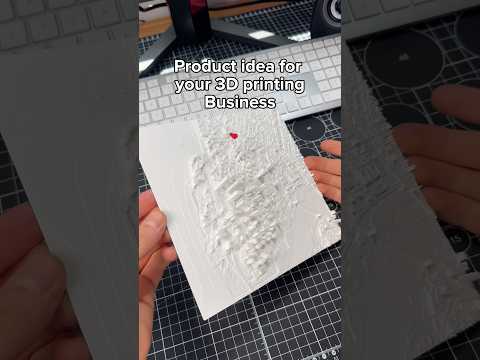
PrintPal's Terrain Map Maker transforms any landmark or landscape into a high-quality 3D printable model—no design experience required. Whether you're commemorating a favorite hiking trail, recreating a city skyline, or gifting a topographic keepsake, this tool makes it effortless.
How the Terrain Map Maker Works
The process is straightforward:
- Enter your landmark — Type any location name or upload a landscape photo
- Select your style — Choose from various visual treatments to match your aesthetic
- Add monuments — Include custom landmarks, buildings, or points of interest
- Generate — Wait approximately 5 minutes for AI to render a detailed 3D model
- Print — Download the file and send it to your 3D printer
Key Features
- No experience needed — The AI handles all the complex terrain modeling
- Location flexibility — Works with any landmark, city, mountain, or custom image
- Style customization — Multiple visual options to personalize your map
- Monument integration — Add custom markers or structures to enhance realism
- Fast turnaround — Professional-quality results in about 5 minutes
Best Materials for Terrain Maps
For optimal results, consider these material options:
- PLA filament — Budget-friendly and easy to print for most terrain models
- Resin — Ideal for capturing fine detail in small monuments and features
- PETG — Good durability with some flexibility for larger prints
Tips for Printing Terrain Maps
- Use a larger layer height (0.2-0.28mm) for the base terrain to save time
- Print monuments at lower layer heights for crisp details
- Consider printing monuments separately and gluing them to the terrain base
- Enable tree supports for steep overhangs in mountainous terrain
Common Questions
What resolution does the tool output?
The Terrain Map Maker generates STL files optimized for FDM and resin printers. Actual resolution depends on your printer settings.
Can I print in multiple colors?
Yes—use a multi-material printer or paint your printed model for custom coloring.
Does it work with any image?
Upload any landscape photo and the AI will convert it into a printable 3D terrain relief.
Try the Terrain Map Maker today and bring any location to life in three dimensions.