About this video
What Is the PrintPal CAD Agent?
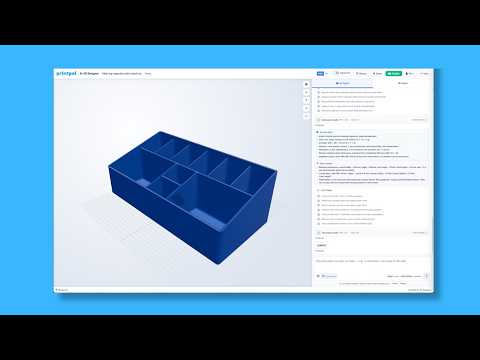
The PrintPal CAD agent is a text-to-CAD tool built into the PrintPal platform that turns plain English descriptions into fully parametric 3D models. Instead of clicking through menus or learning complex CAD software, you simply type what you want and the agent generates a design optimized for 3D printing from the very first iteration.
How Text-to-CAD Works
Getting started takes only a few steps:
- Open PrintPal and navigate to the CAD agent
- Type a short description of the part you need
- The agent builds a parametric model based on your prompt
- Review the list of features it has added during generation
- Edit any single feature or parameter before exporting
- Download the file and send it straight to your 3D printer
Because every feature is tracked individually, you are never locked into the first output. You can tweak dimensions, swap a thread size, or adjust tolerances without rebuilding the part from scratch.
Example Designs You Can Generate With Words
The video demonstrates how versatile the agent is, including:
- Threaded rods and bosses
- Screws and custom fasteners
- Under-desk can or bottle holders
- Living hinges for flexible, single-print parts
- Brackets, mounts, and everyday utility hardware
Each design is generated with print-ready geometry, taking overhangs, tolerances, and layer adhesion into account automatically.
Why This Matters for 3D Printing Workflows
Traditional CAD is one of the biggest barriers for new 3D printer owners. The CAD agent removes that friction by letting you describe the function of a part and receive a usable model in return. For makers, tinkerers, and small businesses, that means less time fighting software and more time printing functional parts.
Tips for Better AI-Generated CAD Models
- Be specific about dimensions, load direction, and mounting points
- Mention the intended material (PLA, PETG, TPU) so features are sized correctly
- Iterate on your prompt to refine geometry between generations
- Always review the feature list before downloading to catch unwanted changes
Frequently Asked Questions
Do I need CAD experience to use it?
No. The tool is designed for users who can describe a part in plain language.
Can I edit the generated model?
Yes. Every feature the agent adds remains editable, so you can refine the design after generation.
What can I print with it?
Anything from functional fasteners and living hinges to desk accessories and custom brackets.
Is it free to try?
Check the PrintPal platform for current access options and pricing tiers.