About this video
What Is PrintPal's CAD Agent?
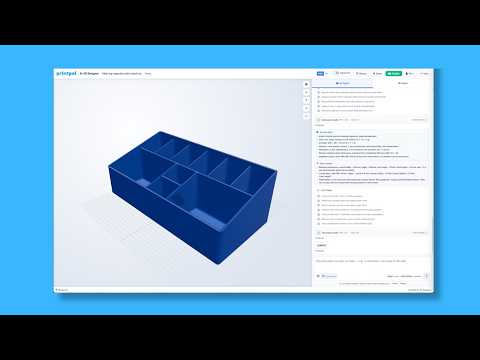
PrintPal's CAD Agent is an AI-powered 3D modeling tool that turns plain-language descriptions into ready-to-print mechanical parts. Instead of wrestling with complex CAD software, you simply type what you need and the agent generates a functional 3D model for you. It's built for makers, hobbyists, engineers, and anyone who wants custom 3D printed parts without a steep design learning curve.
How to Create Custom 3D Prints Without Designing
- Visit PrintPal and open the CAD Agent from the toolbar.
- Describe the part you want in natural language (for example: "a bracket that holds two 6mm rods 50mm apart").
- If you skip dimensions, the AI will guess sensible defaults—you can refine them later.
- Review the generated model and request changes one at a time for the best results.
- Download the file and send it straight to your 3D printer.
Tips for Better AI-Generated 3D Models
- Be specific about the function of the part (load-bearing, decorative, snap-fit, etc.).
- Mention any fasteners, screws, or mating parts so the AI can handle clearances correctly.
- Iterate one change at a time—small, focused tweaks lead to better outcomes than large rewrites.
- Ask for tolerance or fit adjustments if parts need to slide, snap, or press together.
Why Use AI for Mechanical Parts?
Traditional CAD software can take days to master. Tools like PrintPal's CAD Agent remove that barrier entirely, letting you go from idea to printable file in minutes. Whether you need a replacement bracket, a custom clamp, or an under-desk organizer, the AI handles geometry, proportions, and even fastener clearances automatically.
Frequently Asked Questions
Do I need CAD experience to use PrintPal's CAD Agent?
No. The tool is designed for users with zero design background—just describe what you want in everyday language.
Can the AI handle precise tolerances and screw clearances?
Yes. The CAD Agent accounts for common fastener sizes and fit tolerances, as demonstrated in the video with an under-desk can holder screw fit.
Can I edit the generated model afterward?
You can request changes directly through the chat interface, or export the file to your preferred CAD software for advanced edits.